

Imagine asking your AI assistant: “Who manages the person leading our AI research project?” A traditional RAG system would struggle with this question. It might find documents mentioning “AI research” or “project management,” but connecting these disparate pieces through multiple relationships—from project to leader to their manager—requires more than semantic similarity. It requires understanding how information connects.
While Retrieval-Augmented Generation (RAG) has revolutionized AI applications by grounding large language models with factual data, critical limitations have emerged as organizations deploy these systems at scale. Traditional RAG excels at finding semantically similar content, but fails when queries require reasoning across multiple relationships, answering dataset-wide questions, or understanding how entities truly relate to one another.
Enter GraphRAG—an innovative approach that combines the structured power of Knowledge Graphs with the semantic intelligence of vector embeddings. By understanding both what information means and how it connects, GraphRAG enables AI systems to answer complex questions with high accuracy and explainability.
Traditional RAG: Strengths and Limitations
How Traditional RAG Works
Traditional RAG systems follow a straightforward pipeline designed to augment LLM responses with relevant factual information:
- Document Chunking: Break documents into semantic units (paragraphs, sections, or sliding windows)
- Embedding Generation: Convert each chunk into dense vector representations capturing semantic meaning
- Hybrid Search: When a user asks a question, find relevant chunks using:
- Semantic search: Vector similarity (cosine distance) to find semantically related content
- Lexical search: Keyword matching for exact term matches
- Context Injection: Insert the top-k retrieved chunks into the LLM prompt as context
- Response Generation: The LLM generates an answer grounded in the retrieved information
This approach works remarkably well for straightforward fact retrieval. Ask “What is the capital of France?” and RAG will quickly find and return “Paris” from relevant documents.
Critical Limitations
However, as RAG systems face more complex real-world queries, four fundamental limitations emerge:
| Problem | Description | Example |
|---|---|---|
| Multi-hop Reasoning | Requires traversing 2+ relationships that aren’t explicitly stated together | “Who is the manager of the person who wrote about Python?” → Need to connect: Article → Author → Manager |
| Global Questions | Require holistic understanding of entire datasets, not just finding similar chunks | “What are the main themes across all our research?” → Traditional RAG returns random chunks, missing the big picture |
| Relationship-Dependent Queries | Depend on understanding how entities relate, not just their semantic similarity | “Which companies did our competitors acquire?” → Need explicit competitor and acquisition relationships |
| Context Window Constraints | Top-k retrieval returns disconnected chunks, missing broader connections between information | Finding “TechCorp acquired StartupXYZ” but missing that “StartupXYZ’s founder now leads TechCorp’s AI division” |
The Core Problem: Vector similarity excels at finding semantically similar text—if your query mentions “machine learning,” it will find documents about ML. But it fundamentally doesn’t understand relationships. It can’t answer “Who does Alice’s co-author work with?” because that requires understanding:
- Alice wrote Article X
- Article X is related to Article Y
- Article Y was written by Bob
- Bob works with Carol
These relationship chains are invisible to pure vector search.
Enter GraphRAG: Structured Knowledge Meets Semantic Search
What Makes GraphRAG Different
GraphRAG represents a fundamental architectural shift in how we approach retrieval-augmented generation. Instead of treating documents as isolated text chunks connected only by semantic similarity, GraphRAG builds a dual-layer architecture:
- Semantic Layer: Vector embeddings capture meaning and enable similarity search
- Structural Layer: Knowledge Graph explicitly models entities and their relationships
This hybrid approach allows the system to answer both “find me content similar to X” (vector search) and “show me everything connected to Y through relationship Z” (graph traversal).
The key insight: Semantic similarity finds related content; graph structure reveals how information connects.
GraphRAG Construction Pipeline
Building a GraphRAG system involves three distinct phases that transform unstructured documents into a queryable knowledge structure:
Phase 1: Knowledge Graph Building
The foundation of GraphRAG is a well-structured Knowledge Graph that explicitly models your domain:
Step 1: Define Your Ontology
Create a formal model of your domain with classes, properties, and relationships:
Classes (Entity Types):
- Article: Content items (base class)
  - BlogPost (subclass of Article)
  - Tutorial (subclass of Article)
- Author: Content creators
- Topic: Subject areas
- Tag: Content labels

Properties (Attributes):
- title, content, publishedDate
- authorName, authorEmail
- topicName, tagLabel

Relationships (Typed Connections):
- writtenBy: Article → Author
- about: Article → Topic
- hasTag: Article → Tag
- relatedTo: Article → Articleaaa
Step 2: Entity and Relationship Extraction
Process your document corpus to identify entities and extract relationships:
- Use Named Entity Recognition (NER) to identify people, organizations, concepts
- Apply Relation Extraction models or LLMs to discover connections
- Example from text: “Dr. Sarah Johnson, CEO of TechCorp, announced the acquisition of StartupXYZ”
- Entities: Sarah Johnson (Person), TechCorp (Organization), StartupXYZ (Organization)
- Relationships: Sarah Johnson -[CEO_of]→ TechCorp, TechCorp -[acquired]→ StartupXYZ
Step 3: Graph Construction
- Create nodes for each entity with properties (name, type, metadata)
- Create edges with semantic labels representing relationship types
- Store in graph database (e.g., Neo4j, GraphDB, or AllegroGraph)
- Maintain data lineage and provenance
Phase 2: Vector Enhancement
Now we add the semantic layer that traditional RAG relies on:
Step 1: Embedding Generation
- Generate vector embeddings for each entity and document chunk
- Use modern embedding models (e.g, OpenAI, VoyageAI, or Cohere) for high-quality representations
- Typical dimensions: 512-1536 nodes per vector
Step 2: Vector Indexing
- Store vectors in vector databases (e.g., Pinecone, Weaviate, or integrated with graph DB)
- Create indices for fast similarity search
- Critical Integration Step: Link each vector to its corresponding graph node via unique identifiers
This dual storage enables hybrid retrieval: start with vector similarity, then expand through graph relationships.
Phase 3: Community Detection (Optional but Powerful)
For large datasets, add hierarchical structure through community detection:
Step 1: Cluster Related Entities
- Apply clustering algorithms (e.g., K-means, Leiden) on vector embeddings
- Group semantically similar entities into communities
- Example: Articles about “Machine Learning,” “Neural Networks,” and “Deep Learning” cluster together
Step 2: Generate Hierarchical Themes
- Create multiple abstraction levels:
- Level 0: Specific topics (e.g., “Python Data Science Tutorials”)
- Level 1: Broad themes (e.g., “Programming and Software Development”)
- Use LLMs to generate summaries for each community
- Pre-generate these summaries to enable fast “global” question answering
Step 3: Integrate with Graph
- Create Community as a new entity type in your ontology with its own nodes in the Knowledge Graph
- Link entities to their communities via
belongsToCommunityrelationships - Store community metadata: member count, dominant topics, hierarchical level
Community summaries allow a GrapRAG system to answer questions that require knowledge about the all content in the repository, not just an individual chunk or even a whole document.

GraphRAG Query-Time Process
When a user submits a query, GraphRAG orchestrates a sophisticated retrieval pipeline:

Key Advantages:
- Graph traversal finds exact relationship matches with perfect relevance (score: 1.0), ensuring they’re always included in the LLM context
- Vector search catches semantically similar content even without exact entity matches, typically with lower similarity scores (0.5-0.9)
- Combining both approaches provides comprehensive coverage: guaranteed inclusion of structurally relevant content plus semantically similar results
- Relationship paths enable explainable reasoning chains
A Real-World Example: Comparing Traditional RAG vs GraphRAG
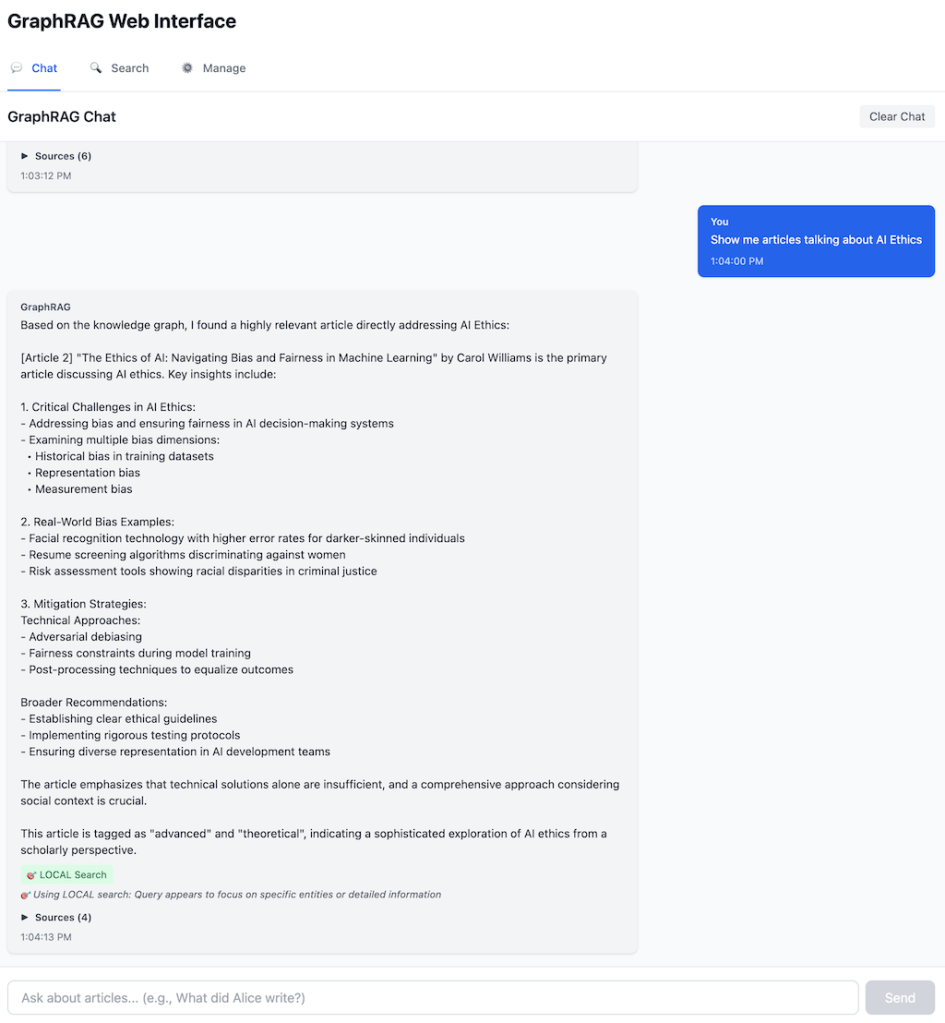
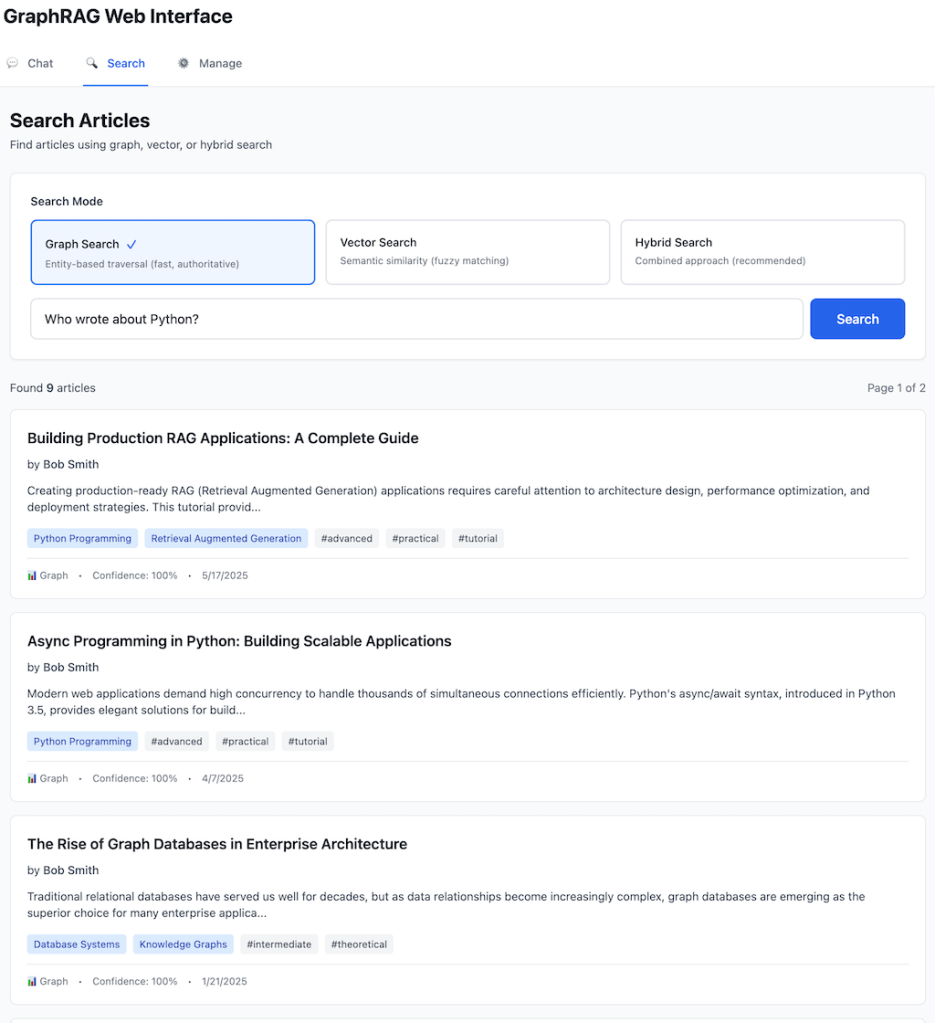
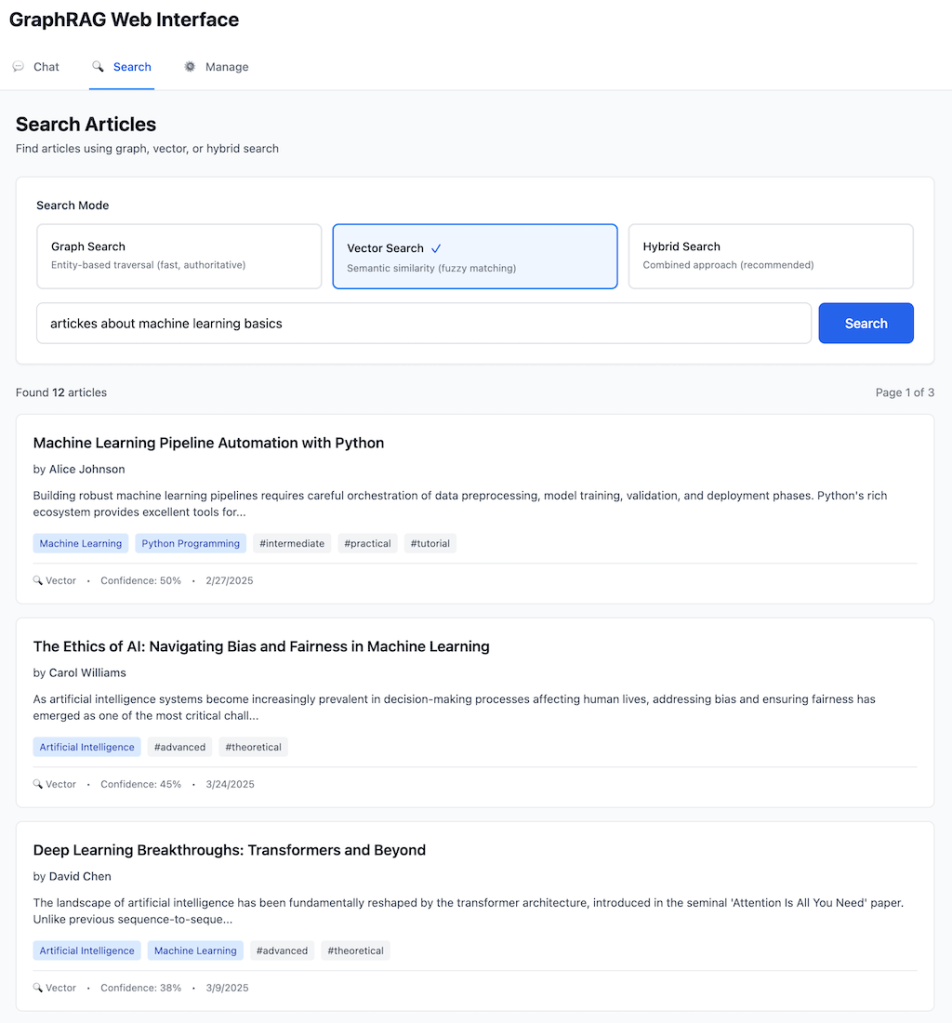
Let’s see the difference in action with a concrete scenario. The following examples are drawn from the GraphRAG system that I built—a technical knowledge base with a repository of articles about Python, Knowledge Graphs, and Machine Learning. This system features intelligent query routing, entity extraction with confidence scoring, multi-hop graph traversal, community detection for thematic clustering, and hybrid retrieval combining RDF knowledge graphs with vector embeddings. The architecture includes both a CLI and REST API interfaces plus, web UI with LLM Chat and Search options demonstrating that GraphRAG is not just theoretical—it’s a practical, deployable solution.
The Scenario
Document Corpus: A repository of articles about Python, Knowledge Graphs, Machine Learning Authors: Alice Johnson, Bob Smith, Carol Williams, David Lee Query: “Who wrote tutorials about topics related to what Alice wrote about?”
Traditional RAG Response
[Vector search finds chunks containing "Alice" and "tutorial"]

Result: "Alice Johnson wrote several tutorials including 'Introduction
to Knowledge Graphs' and 'Getting Started with SPARQL.' These tutorials
cover Knowledge Graphs and semantic technologies."

Problem: Answered the wrong question! User asked about authors who
wrote tutorials on topics related to Alice's work, not Alice's own
tutorials.
Why It Failed: Vector similarity found documents mentioning both “Alice” and “tutorial” but couldn’t perform the required reasoning:
- Find what Alice wrote about (Topics)
- Find other articles about those same Topics
- Filter for articles that are tutorials
- Return the authors of those articles
GraphRAG Response
[Entity extraction identifies: Alice (Author)]
[Graph traversal executes multi-hop query]

Step 1: Find Alice's articles
  → Alice writtenBy [Article 1, Article 2, Article 4]

Step 2: Find topics of Alice's articles
  → Article 1 about [Knowledge Graphs]
  → Article 2 about [SPARQL]
  → Article 4 about [Python]

Step 3: Find other articles about these topics
  → Knowledge Graphs: [Article 5, Article 7]
  → SPARQL: [Article 8]
  → Python: [Article 10, Article 12]
Step 4: Filter for tutorials
  → Article 5 (Tutorial): "Graph Database Fundamentals"
  → Article 10 (Tutorial): "Python Data Science Guide"

Step 5: Get authors
  → Article 5 writtenBy Carol Williams
  → Article 10 writtenBy Bob Smith

Result: "Carol Williams and Bob Smith wrote tutorials about topics
related to Alice's work. Carol's tutorial 'Graph Database Fundamentals'
covers Knowledge Graphs, which Alice also wrote about. Bob's tutorial
'Python Data Science Guide' focuses on Python, another topic Alice
has covered.

[Explanation path]:
- Alice → wrote articles about → [Knowledge Graphs, Python]
- [Knowledge Graphs, Python] → covered by → [other tutorials]
- [other tutorials] → written by → [Carol Williams, Bob Smith]
Why It Succeeded: GraphRAG traversed explicit relationships:
writtenByrelationships connected articles to authorsaboutrelationships connected articles to topicstypeproperties distinguished tutorials from other content- Multi-hop traversal chained these relationships logically
Additional Capability – Explainability:
GraphRAG also provides the reasoning path:
Alice → Article 4 → Topic:Python → Article 10 → Bob Smith
         ↓
    Article 1 → Topic:KnowledgeGraphs → Article 5 → Carol Williams

This graph path shows exactly how the answer was derived, enabling users to trust and verify the AI's reasoning.
Performance Comparison
| Metric | Traditional RAG | GraphRAG |
|---|---|---|
| Accuracy | Incorrect answer (returned Alice’s own work) | Correct answer with proper reasoning |
| Query Time | ~0.3s (vector search only) | ~1.2s (entity extraction + graph traversal + vector search) |
| Explainability | “Found documents mentioning Alice and tutorials” | Full relationship path showing exact reasoning |
| Hallucination Risk | High (might invent connections) | Low (only returns verified graph relationships) |
Implementation Deep Dive: Building a GraphRAG System
Let’s walk through building a production-ready GraphRAG system.
Architecture Overview

Phase 1: Knowledge Graph Construction
Example: Processing Blog Articles into RDF Triples
The process of converting articles into a Knowledge Graph follows these steps:
- Define your namespace and ontology – Establish custom vocabularies for your domain (e.g., content namespace for articles, authors, topics)
- Create entity nodes – For each article, create a unique URI and assign it to the appropriate class (Tutorial, BlogPost, etc.)
- Add properties – Attach literals for attributes like title, content, and publication date with proper data typing
- Model relationships – Create typed connections between entities:
- Link articles to authors via
writtenByrelationships - Connect articles to topics via
aboutrelationships - Tag articles with labels via
hasTagrelationships
- Link articles to authors via
- Build the graph – Instantiate all nodes and edges in your RDF graph
- Serialize and store – Export the graph in Turtle format for human readability and storage
Output:
@prefix content: <http://example.org/content/> .
@prefix xsd: <http://www.w3.org/2001/XMLSchema#> .

content:article_001 a content:Tutorial ;
    content:title "Introduction to Knowledge Graphs" ;
    content:content "Knowledge Graphs represent information as..." ;
    content:publishedDate "2024-01-15"^^xsd:date ;
    content:writtenBy content:author_alice_johnson ;
    content:about content:topic_knowledge_graphs ;
    content:about content:topic_rdf ;
    content:hasTag content:tag_tutorial ;
    content:hasTag content:tag_beginner .

content:author_alice_johnson a content:Author ;
    content:name "Alice Johnson" .

content:topic_knowledge_graphs a content:Topic ;
    content:name "Knowledge Graphs" .aaaaq
Phase 2: Vector Embeddings
Generating and Storing Embeddings:
The vector enhancement process involves these key steps:
- Initialize embedding service – Set up your embedding API client (OpenAI, Voyage, Cohere, etc.) with appropriate model selection
- Query the Knowledge Graph – Use SPARQL to retrieve all articles with their content, titles, and metadata
- Prepare text for embedding – Combine title and content into a single text representation for each article
- Generate embeddings – Call the embedding API to convert text into dense vector representations (typically 512-1536 dimensions)
- Create embedded nodes – Package each embedding with its metadata (node ID, type, URI, title) for easy retrieval
- Cache embeddings – Serialize and store embeddings to avoid redundant API calls on subsequent runs
- Build search index – Create an efficient similarity search structure using the embedding vectors
Vector Search Implementation:
The search process works as follows:
- Embed the query – Convert user’s search query into a vector using the same embedding model
- Calculate similarities – Compute cosine similarity between query vector and all document vectors
- Rank results – Sort documents by similarity score in descending order
- Return top-k matches – Retrieve the most relevant results with their metadata and scores
Sample Output:
Introduction to Knowledge Graphs (score: 0.892)
Graph Database Fundamentals (score: 0.847)
Getting Started with SPARQL (score: 0.801)
Phase 3: Community Detection
Clustering Articles by Topic:
The community detection process identifies thematic groups within your document collection:
- Initialize clustering – Set up your clustering algorithm (K-means, Leiden, etc.) with desired number of communities
- Cluster embeddings – Apply the algorithm to your article embeddings to discover natural groupings based on semantic similarity
- Organize by community – Group articles into their assigned clusters for analysis
- Analyze each community – For each cluster:
- Extract topics and tags from the Knowledge Graph using SPARQL queries
- Count frequencies to identify dominant themes
- Collect author information
- Calculate cluster quality metrics (silhouette scores, etc.)
- Generate semantic summaries – Use an LLM to create natural language descriptions of each community’s theme based on its articles, topics, and tags
- Build hierarchical structure – Create multiple abstraction levels:
- Level 0: Specific topic communities (e.g., 4-6 clusters)
- Level 1: Broad thematic groups (e.g., 2-3 meta-clusters)
- Integrate with Knowledge Graph – Add Community entities to your ontology with relationships to member articles
- Cache results – Store community assignments and summaries for fast retrieval
Sample Output:
=== Community Detection Results ===

Level 0 Communities (Specific):
├─ Community 0: "Knowledge Graph Fundamentals" (4 articles)
│  Dominant Topics: Knowledge Graphs, RDF, SPARQL
│  Dominant Tags: tutorial, beginner
│  Authors: Alice Johnson, Carol Williams
│  Silhouette Score: 0.67
│
├─ Community 1: "AI & Machine Learning" (3 articles)
│  Dominant Topics: Artificial Intelligence, Machine Learning
│  Dominant Tags: advanced, research
│  Authors: Bob Smith, Alice Johnson
│  Silhouette Score: 0.71
│
└─ ... (2 more communities)

Level 1 Themes (Broad):
├─ Theme 0: "Technical Knowledge & Programming" (7 articles)
│  Child Communities: 0, 2
│
└─ Theme 1: "AI Research & Applications" (5 articles)
   Child Communities: 1, 3
GraphRAG Web UI

Implementation Highlights
Smart Caching System:
- SHA256 hash-based change detection for both graph and embeddings
- Only rebuilds when source data changes
- Typical cold start: ~3 seconds (API calls)
- Warm start (cached): ~0.1 seconds
Performance Metrics:
- Graph loading: 350+ triples in <0.1s
- Entity extraction: ~0.5s (Claude API)
- Graph traversal: <0.05s per query
- Vector search: <0.2s for similarity matching
- End-to-end query: 1-2 seconds average
Code Example (Entity Extraction + Graph Traversal):
# Entity extraction
entities = entity_extractor.extract_entities(
    "Who wrote about Python?",
    confidence_threshold=0.3
)
# Returns: [{"entity": "Python", "type": "Topic",
#            "node_id": "topic_python", "confidence": 0.92}]

# Graph traversal
articles = kg.get_topic_articles("topic_python")
# SPARQL: SELECT ?article WHERE {
#   ?article content:about content:topic_python
# }

authors = [kg.get_article_author(article)
           for article in articles]
# Multi-hop: article → writtenBy → author
This implementation demonstrates that GraphRAG isn’t just theoretical—it’s a practical, performant solution for real-world knowledge-intensive applications.
When to Use GraphRAG
GraphRAG represents a significant architectural investment. Here’s when it’s the right choice:
GraphRAG is Ideal For:
1. Complex, Relationship-Rich Domains
- Legal research: Cases cite precedents, statutes reference regulations
- Scientific research: Papers cite papers, experiments build on prior work
- Enterprise knowledge bases: Projects involve people, documents reference policies
- Healthcare: Conditions relate to treatments, drugs interact with drugs
2. Multi-Hop Reasoning Requirements
- Questions requiring 2+ relationship traversals
- “Who manages the team working on the project related to X?”
- “What treatments are used for conditions similar to Y’s diagnosis?”
3. Need for Explainable AI
- Regulated industries requiring audit trails
- High-stakes decisions needing transparency
- User trust dependent on understanding why AI made recommendations
- Graph paths provide clear reasoning chains: A → B → C
4. Large Document Collections Requiring Organization
- Thousands to millions of documents
- Need to understand themes/structure (“What are we researching?”)
- Community detection provides hierarchical organization
- Enables both specific queries and holistic understanding
5. Accuracy and Hallucination Reduction Critical
- Graph validation prevents false claims
- Authoritative data prioritization improves reliability
- Structured knowledge reduces LLM speculation
Traditional RAG May Suffice For:
1. Simple Fact Retrieval
- Single-document Q&A
- “What is the definition of X?”
- No relationship traversal needed
2. Small Document Collections
- <100 documents where relationships aren’t complex
- Graph construction overhead not justified
3. Single-Hop Queries Only
- All questions answered with direct lookup
- “Who wrote this paper?” (not “Who collaborated with this author’s mentor?”)
4. No Relationship Dependencies
- Documents are truly independent
- Connections between content not meaningful
Decision Framework:
Ask yourself:
- Do I have explicit relationships to model? (If no → traditional RAG)
- Do users ask multi-hop questions? (If yes → GraphRAG)
- Is explainability important? (If yes → GraphRAG)
- Is my domain relationship-rich? (If yes → GraphRAG)
- Do I need dataset-wide understanding? (If yes → GraphRAG with communities)
Rule of thumb: If you find yourself saying “I wish I could ask the system how X relates to Y,” you need GraphRAG.
Conclusion
The evolution from traditional RAG to GraphRAG represents more than a technical advancement—it’s a fundamental shift in how we think about AI-powered information retrieval. By combining the semantic intelligence of vector embeddings with the structural precision of Knowledge Graphs, GraphRAG enables AI systems to not just find similar content, but to understand how information connects.
The Key Insight: Context isn’t just about semantic similarity. Real understanding requires knowing that Alice wrote Article X, which discusses Topic Y, which relates to Project Z, led by Manager M. These relationship chains—invisible to pure vector search—are the foundation of intelligent question answering.
GraphRAG solves the critical limitations that have emerged as RAG systems scale:
- Multi-hop reasoning through explicit graph traversal
- Global questions via hierarchical community summaries
- Relationship-dependent queries with typed, validated connections
- Reduced hallucinations through authoritative graph validation
As organizations deploy more sophisticated AI applications, the trend toward hybrid architectures combining multiple retrieval strategies will accelerate. GraphRAG isn’t replacing vector search—it’s augmenting it with the structured knowledge that makes complex reasoning possible.
Ready to build your own GraphRAG system? Start by defining your domain ontology. What are your key entity types? What relationships matter in your domain? The effort of modeling your knowledge pays dividends in accuracy, explainability, and the ability to answer questions that pure similarity search simply cannot handle.
The future of RAG is structured, relationship-aware, and explainable. The future is GraphRAG.
Additional Resources
Learn More:
- Microsoft GraphRAG: https://github.com/microsoft/graphrag
- Neo4j Graph Database: https://neo4j.com/
- RDF and Knowledge Graphs: https://www.w3.org/RDF/
Key Papers:
- “From Local to Global: A Graph RAG Approach to Query-Focused Summarization” (Microsoft Research, 2024)
- “Retrieval-Augmented Generation for Knowledge-Intensive NLP Tasks” (Lewis et al., 2020)
Want to explore GraphRAG in your domain? The architectural patterns we’ve discussed are domain-agnostic—start with your ontology and watch as structured knowledge transforms your AI’s capabilities.
 Igor's Musings About Technology
1 Comment