

This blog is about a project I built to confirm an idea: LLM reasoning can generate declarative query specifications in response to natural language questions—provided the model is augmented with semantic descriptions of database objects. The AI agent discovers relevant data through embedding vectors generated from semantic metadata, produces a structured specification rather than raw SQL, and then a dedicated layer converts that specification into the native SQL needed for Oracle tables or Analytic Views. The result is secure, validated queries that unlock Oracle’s advanced OLAP capabilities through conversation.
Introduction: The Agent in Action
Before diving into technical details, here’s a quick video demonstrating how a financial analyst might use the agent to prepare for a Quarterly Business Review (please note that SH seed data only cover 2019 to 2022 time period):
The demo models a natural analysis progression, mixing table lookups and Analytic View queries behind the scenes. The list below shows questions with analyst purpose for asking it:
- “What were our total sales last year?” – starting point is annual overview
- “How does that compare to the prior year?” – get year-over-year context
- “Show me the quarterly breakdown for last year” – see quarterly trend
- “Which quarter had the highest growth vs prior year?” – find the best performing period
- “What drove Q2 performance? Show me by product category” – understand contribution per product category
- “How did Golf specifically perform each quarter?” – a seep dive on a specific category
- “What are the subcategories within Golf?” – dimension exploration
- “Show Golf subcategory sales for Q2 vs Q4” – subcategory comparison best. vs. worst performing quarter
- “Which regions contributed most to Q2 Golf Bags and Carts sales?” – check geographic breakdown
- “What’s each region’s share of total Golf revenue?” – finally, run market share analysis
Notice how the conversation naturally shifts between reference data lookups (question 7) and multi-dimensional analytics (e.g., questions 4, 5, 10). The agent transparently chooses the right query path for each question.
Now let’s explore how this works under the hood.
Conceptual Approach to Addressing Challenges
The Problem with LLM-Generated Native SQL
When building AI assistants that query databases, the obvious approach is to have the LLM extract relevant entities from a user question and then construct native SQL directly using a seeded template. That sounds simple, but this approach has serious limitations:
- Security risks: SQL injection becomes a real concern when an LLM constructs queries from user input
- Validation difficulty: How do you verify that DELETE FROM users won’t slip through?
- Schema coupling: The LLM needs to understand your exact table structures, joins, and naming conventions which is often achieved by using query templates
- No guardrails: Nothing prevents queries that scan entire tables or create a cross joins (Cartesian products)
- Complex syntax errors: Specialized features like Oracle Analytic Views require precise, non-obvious SQL patterns that LLMs frequently get wrong
The Declarative Approach – QuerySpec
Instead of generating SQL strings, our LLM is asked to generate a structured QuerySpec object which is a Pydantic model that describes what data is needed, not how to fetch it:
lass QuerySpec(BaseModel):
    """Structured query specification—what the LLM actually produces."""

    table: str                           # Target table/view
    select_columns: list[SelectColumn]   # Columns to retrieve
    filters: list[FilterCondition]       # WHERE conditions
    group_by: list[str] | None           # Grouping columns
    order_by: list[OrderByClause] | None # Sorting
    limit: int | None                    # Row limit (max 1000)
The Python layer then validates and converts this to native SQL:
def build_sql(spec: QuerySpec) -> str:
    # Validate table exists in allowed list
    if spec.table not in ALLOWED_TABLES:
        raise ValueError(f"Table {spec.table} not permitted")

    # Validate columns exist in schema metadata
    validate_columns(spec.table, spec.select_columns)

    # Build parameterized SQL (no injection possible)
    return generate_safe_sql(spec)
Key benefits:
- SQL injection is impossible—we control SQL generation entirely
- Every query is validated against schema metadata before execution
- Automatic guardrails (row limits, allowed tables, no DDL operations)
- The LLM focuses on understanding the question, not SQL syntax quirks
Adding RAG for Schema Discovery
A natural language question like “What were our top products last quarter?” requires LLM knowing which tables contain product and sales data. Hard-coding this into prompts doesn’t scale plus, that bloats token usage as your schema grows.
Instead, we use embedding-based semantic discovery of database tables and columns they have *embedding vectors are generated using VoyageAI):
# At indexing time: embed table/column descriptions
embeddings = voyage_client.embed(
    texts=["Sales transactions with revenue, quantity, and dates...",
           "Product catalog with categories and hierarchies...",
           "Customer information including regions and segments..."],
    model="voyage-3"
)

# Store in ChromaDB with metadata
collection.add(
    embeddings=embeddings,
    documents=descriptions,
    metadatas=[{"object_type": "FACT_TABLE", ...}],
    ids=["sh.sales", "sh.products", "sh.customers"]
)

# At query time: find relevant objects
question_embedding = voyage_client.embed("top products last quarter")
relevant_objects = collection.query(
    query_embeddings=[question_embedding],
    n_results=3
)
As a result, the system prompt dynamically includes only relevant schema information:
def build_context(question: str) -> str:
    objects = find_relevant_objects(question)
    return f"""
    Available data sources for this query:
    {format_object_schemas(objects)}

    Generate a QuerySpec to answer: {question}
    """
This keeps prompts focused and reduces potential hallucination as the LLM only sees objects that semantically match the question.
Semantic Metadata Beyond Column Names
Raw schema information (SALES.AMOUNT_SOLD NUMBER(10,2)) doesn’t capture meaning. The EmbeddingMetadata model in AVRAG provides the semantic context that LLMs need:
class EmbeddingMetadata(BaseModel):
    """Rich metadata for vector embedding and LLM context."""

    id: str                                # "sh.sales"
    object_name: str              # "sales"
    schema_name: str            # "sh"
    object_type: ObjectType      # FACT_TABLE, DIMENSION_TABLE, ANALYTIC_VIEW

    # Semantic descriptions
    primary_purpose: str         # "Daily sales transactions with revenue..."
    typical_questions: list[str ] # ["What were total sales?", "Top products?"]

    # Structural metadata
    columns: list[ColumnMetadata]
    key_dimensions: list[str]    # ["time_id", "prod_id", "cust_id"]
    key_measures: list[str]      # ["amount_sold", "quantity_sold"]
    related_objects: list[str]     # ["sh.products", "sh.customers"]
The typical_questions field is particularly powerful as it allows to directly bridge user intent to data objects. When someone asks “What were our best-selling products?”, the embedding similarity matches against questions like “Top products by revenue?” and “Best performers by sales volume?”.
For Analytic Views, the metadata is even richer:
class AnalyticViewMetadata(BaseModel):
    """Extended metadata for Oracle Analytic Views."""

    id: str                       # "sh.sh_sales_history_av"
    av_name: str                  # "sh_sales_history_av"
    description: str              # Rich semantic description
    business_context: str         # "Use for time-series analysis..."
    synonyms: list[str]           # ["revenue analysis", "sales trends"]

    # Hierarchy definitions
    hierarchies: list[AVHierarchyMetadata]
    # Available measures (including calculated)
    measures: list[AVMeasureMetadata]
This metadata layer is the foundation that makes natural language queries possible against complex OLAP structures.
The Oracle Analytic View Challenge
Oracle Analytic Views (AVs) are logical OLAP structures that handle complex analytics automatically:
- Automatic aggregation at any hierarchy level
- Built-in calculations for YoY, YTD, and share-of-parent
- Hierarchical dimensions e.g., (Year -> Quarter -> Month -> Day)
But they require specialized SQL syntax:
-- Analytic View query with HIERARCHIES clause
SELECT
    sh_times_calendar_hier.member_name AS period,
    sh_products_hier.member_name AS category,
    amount_sold,
    sales_pctchg_cal_year_ago AS yoy_growth
FROM sh_sales_history_av
HIERARCHIES (sh_times_calendar_hier, sh_products_hier)
WHERE sh_times_calendar_hier.level_name = 'CALENDAR_QUARTER'
  AND sh_products_hier.level_name = 'CATEGORY'
Teaching an LLM this syntax reliably is difficult. Trying to explain LLM how to use the HIERARCHIES clause, level_name filters, or calculated measure names (e.g., sales_pctchg_cal_year_ago) are error-prone. Our solution was to use a specialized AnalyticViewQuerySpec object:
class AnalyticViewQuerySpec(BaseModel):
    """Declarative spec for Analytic View queries."""

    hierarchies: list[HierarchySpec]             # Dimensions to include
    select_columns: list[AVSelectColumn]  # Measures and attributes
    filters: list[AVFilterCondition]                  # Member-level filters
    order_by: list[AVOrderByClause] | None
    limit: int | None

class HierarchySpec(BaseModel):
    hierarchy: AVHierarchy        # Enum: TIME_CALENDAR, PRODUCTS, CUSTOMERS...
    level: HierarchyLevelName   # Enum: CALENDAR_QUARTER, CATEGORY...
    member_filter: str | None   # e.g., "2024-Q4"
The LLM specifies dimensions and measures using constrained enums; we generate the complex HIERARCHIES syntax:
# LLM produces this structured spec
spec = AnalyticViewQuerySpec(
    hierarchies=[
        HierarchySpec(hierarchy=AVHierarchy.TIME_CALENDAR,
                      level=HierarchyLevelName.CALENDAR_QUARTER),
        HierarchySpec(hierarchy=AVHierarchy.PRODUCTS,
                      level=HierarchyLevelName.CATEGORY)
    ],
    select_columns=[
        AVSelectColumn(column=AVMeasure.AMOUNT_SOLD),
        AVSelectColumn(column=AVMeasure.SALES_PCTCHG_CAL_YEAR_AGO)
    ]
)

# SQL generator produces the correct Oracle syntax
sql = av_sql_generator.generate(spec)
The Critical Metadata Lookup Problem
Here’s a challenge we hit early: the LLM doesn’t know how hierarchy members are formatted. When a user asks about “Q4 performance” is that ‘Q4’, ‘2024-Q4’, ‘Q4 2024’, or ‘CY2024-Q04’?
Without accurate member names, filters fail silently by returning empty results instead of errors.
Our solution was to implement a dedicated metadata lookup tool that the agent calls before generating queries:
@tool
def lookup_hierarchy_metadata(
    hierarchy: str,
    level: str = None
) -> str:
    """Look up valid member names and formats for filtering.

    Args:
        hierarchy: The hierarchy name (e.g., "time", "products")
        level: Optional specific level (e.g., "quarter", "category")

    Returns:
        JSON with member formats and example values
    """
    return get_hierarchy_metadata(hierarchy, level)
The response includes actual member values from the database:
{
  "hierarchy": "sh_times_calendar_hier",
  "level": "CALENDAR_QUARTER",
  "format": "YYYY-QN",
  "examples": ["2023-Q1", "2023-Q2", "2023-Q3", "2023-Q4", "2024-Q1"],
  "range": {
    "min": "2018-Q1",
    "max": "2024-Q4"
  }
}
This lookup pattern significantly reduces query failures from format mismatches.
Agent Architecture – Use Tools Over Prompts
Here’s how all the components fit together:
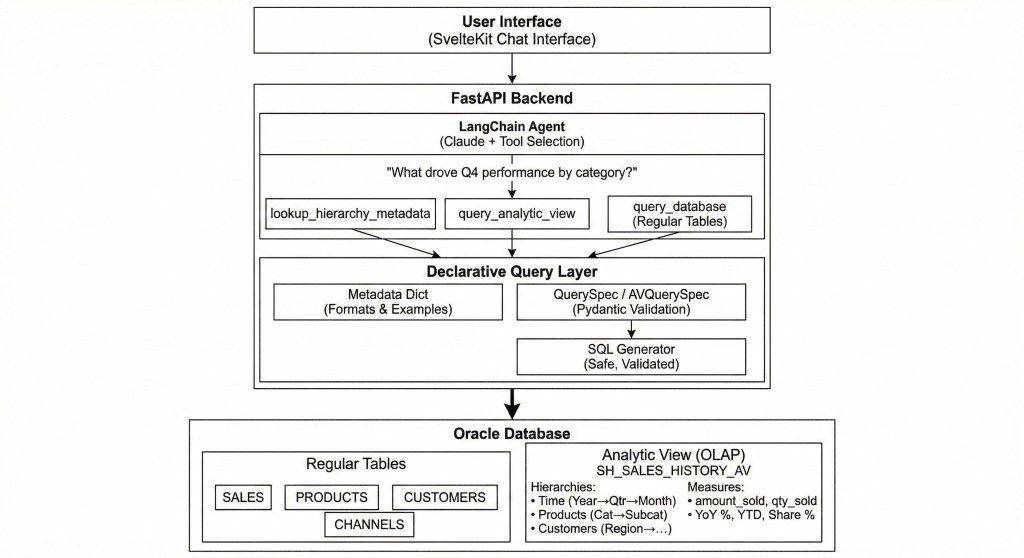
The Data flow:
- User asks a natural language question
- LLM agent selects the appropriate tool based on question semantics
- Tool produces a declarative spec (not raw SQL)
- Python layer validates and generates safe SQL
- Native SQL query is executed against tables or Analytic View
- Results return through the agent with natural language explanation
Tool Selection Criteria
The system prompt guides the LLM to choose the right available tool:
| Tool | Use When |
|---|---|
| query_analytic_view | YoY comparisons, YTD totals, share/contribution analysis, multi-dimensional aggregations, hierarchical drill-downs |
| query_database | Dimension lookups, raw transaction details, simple filters, cost data (not in AV) |
| lookup_hierarchy_metadata | Need to discover valid member names before filtering |
The tools themselves enforce the above separation separation:
@tool
async def query_database(query_spec: str) -> str:
    """Query regular database tables using a QuerySpec.

    Use for: dimension lookups, raw transactions, reference data.
    """
    spec = QuerySpec.model_validate_json(query_spec)
    return await execute_validated_query(spec)

@tool
async def query_analytic_view(
    hierarchies: list[str],
    measures: list[str],
    filters: dict | None = None
) -> str:
    """Query the Analytic View for time-series and OLAP analysis.

    Use for: YoY comparisons, YTD calculations, share analysis,
    hierarchical aggregations.
    """
    spec = build_av_spec(hierarchies, measures, filters)
    return await execute_av_query(spec)

@tool
def lookup_hierarchy_metadata(hierarchy: str, level: str = None) -> str:
    """Look up valid member names and formats for filtering.

    Call BEFORE query_analytic_view when you need to filter
    by specific members (quarters, categories, regions, etc.)
    """
    return get_metadata(hierarchy, level)
The Data Panel: Structured Results
Raw JSON or markdown tables aren’t always the best way to present query results. The front-end service parses special [DATA_PANEL] blocks to render visualizations relevant for returned data shape:
[DATA_PANEL]
{
  "title": "Sales by Region",
  "columns": ["region", "sales", "yoy_growth"],
  "rows": [
    ["Americas", 1500000, 12.5],
    ["Europe", 1200000, 8.3],
    ["Asia-Pacific", 980000, 15.2]
  ],
  "chart_type": "bar"
}
[/DATA_PANEL]
The agent includes these blocks in its response when tabular data is returned, and the SvelteKit front-end renders them as interactive charts or sortable tables based on the chart_type:
- bar – Categorical comparisons
- line – Time series trends
- table – Detailed data (default)
This separation means the LLM focuses on analysis while the front-end handles visualization.
Async Architecture for Responsive UX
Database queries can take seconds—especially analytical aggregations over large datasets. The architecture uses async throughout to keep the API responsive:
# Connection pool with async support
pool = oracledb.create_pool_async(
    user=settings.oracle_user,
    password=settings.sh_password,
    dsn=settings.oracle_dsn,
    min=2,
    max=10,
)

# Async query execution
async def execute_av_query(spec: AnalyticViewQuerySpec) -> QueryResult:
    sql = av_sql_generator.generate(spec)

    async with pool.acquire() as conn:
        async with conn.cursor() as cursor:
            await cursor.execute(sql)
            columns = [col[0] for col in cursor.description]
            rows = await cursor.fetchall()

    return QueryResult(columns=columns, rows=rows)
For table queries, we use SQLAlchemy’s async session:
async with AsyncSession(engine) as session:
    result = await session.execute(select(Sales).where(...))
    return result.scalars().all()
This allows the agent to remain responsive during multi-tool interactions as it can look up metadata, execute queries, and stream responses concurrently.
Results and Lessons Learned
After implementing this architecture, we tested against 95 question patterns covering:
- Single and multi-dimensional queries
- YoY/YTD calculations
- Share-of-parent analysis
- Filtered and ranked results
Key results:
- Zero SQL injection vulnerabilities (by design)
- Consistent correct answers across all tested categories
- Clear separation between LLM reasoning and native SQL query generation
- Easy to extend with new tables or Analytic Views
Lessons learned:
- Declarative > Imperative for LLMs: Asking an LLM to describe intent works better than asking it to write implementation code
- Metadata tools reduce hallucination: A lookup tool for valid values beats stuffing everything into the system prompt plus, it saves tokens
- Type validation catches errors early: Pydantic models reject invalid specs with clear error messages before any raw SQL runs
- Semantic search scales: Embedding-based object discovery means adding new tables doesn’t bloat prompts as database objects are included only when relevant
- Enums constrain the LLM: Using Python enums for hierarchy names and measure types prevents the LLM from inventing non-existent columns
- Separate query paths for separate concerns: Tables and Analytic Views have fundamentally different query patterns. Using separate tools make this explicit.
When to Use This Agentic Pattern
This agent architecture fits well when:
- You need validated, secure database access from an AI agent
- Your schema has specialized features (like Analytic Views) with complex syntax
- You want guardrails on what SQL queries agent can run
- Schema discovery needs to scale beyond a handful of tables
- Users can ask questions that span both simple data lookups and complex analytics queries
It may be overkill for:
- Simple single-table lookups
- Prototypes where security isn’t critical
- Schemas small enough to fit entirely in a prompt
Technology Stack
| Layer | Technology |
|---|---|
| Frontend | SvelteKit 2, Svelte 5, TypeScript, TailwindCSS 4 |
| Backend | FastAPI, Python 3.13+, SQLModel, Pydantic |
| LLM | Anthropic Claude (claude-sonnet-4.5), LangChain |
| Database | Oracle Database (oracledb async driver) |
| Embeddings | VoyageAI (voyage-3) |
| Vector Store | ChromaDB |
Conclusion
The declarative query approach transforms how AI agents interact with databases. By having the LLM produce structured specifications rather than raw SQL, we gain security, validation, and the ability to support complex database features that would be error-prone to generate directly.
For enterprise applications with Oracle Analytic Views, this pattern unlocks powerful OLAP capabilities (such as year-over-year analysis, hierarchical aggregations, share calculations) through natural language, without sacrificing control over what actually executes against your database.
The key insight: let the LLM do what it’s good at (understanding user intent) and let the code do what it’s good at (validation, type safety, native SQL generation). The declarative data layer is the clean interface between them.
The code for this project is available in my repository on GitHub.
Have questions about implementing declarative query agents? Found this pattern useful for your own database AI projects? Drop a comment below or reach out on LinkedIn.
 Igor's Musings About Technology