
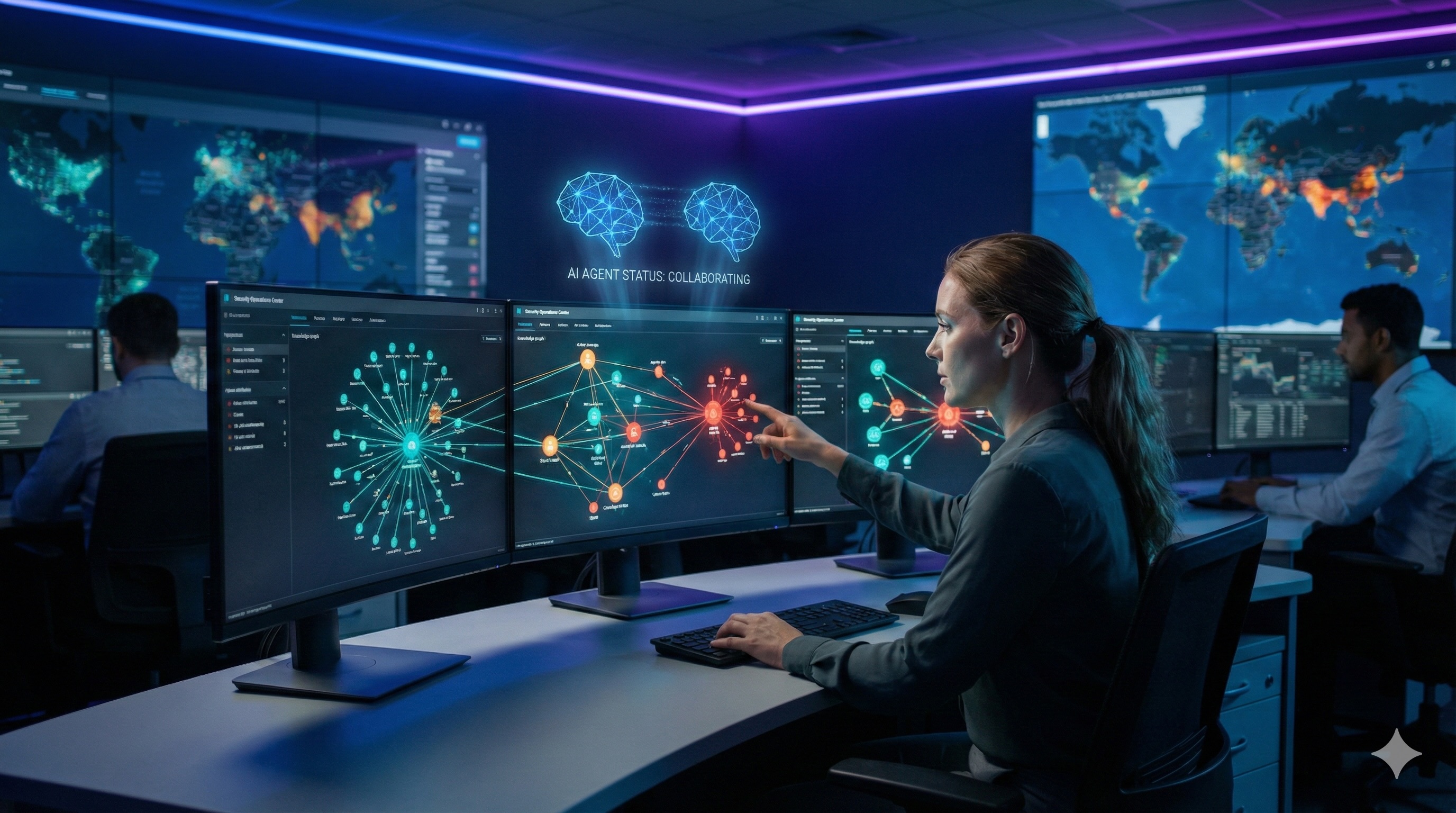
This blog describes a cybersecurity threat intelligence platform built in Python that models relationships between threat actors, attack techniques, vulnerabilities, malware, and affected assets as a knowledge graph. Security analysts interact with the system to investigate threats, while an autonomous research agent discovers new threat correlations and either automatically updates the knowledge graph or escalates uncertain findings for human validation and resolution.
The threat intelligence platform is a multi-agent system that demonstrates three key agentic design patterns: MCP (Model Context Protocol) – Agent 1 exposes Graph DB tools via MCP, enabling LLM clients to interact with the knowledge graph; A2A (Agent-to-Agent Protocol) – Agent 2 collaborates with Agent 1 via A2A, enabling autonomous multi-agent coordination; HITL (Human-in-the-Loop) – escalation mechanism for Agent 2 when confidence is low, routing decisions to human analysts
Introduction
In the A Framework for Testing Agentic Design Patterns Using LangChain & LangGraph blog, we explored 10 foundational agentic design patterns such as chaining, routing, and parallelization by building a Python application using LangChain and LangGraph framework for testing each pattern with several pre-configured representative use cases against Anthropic, Google, or OpenAI LLMs.
Those foundational patterns are relatively simple, which allowed us to model real-life customer use cases without building a separate application for each test scenario. In this follow-up blog, I wanted to explore more complex agentic design patterns such as agent-to-agent (A2A) communication and human-in-the-loop (HITL). A system that genuinely needs collaboration between multiple agents built with different agent frameworks, plus an HITL escalation mechanism, requires modeling a real customer use case to have representative scenarios.
Therefore, I decided to build a cybersecurity threat intelligence platform that models relationships between threat actors, attack techniques, vulnerabilities, and affected assets as a knowledge graph. Security analysts interact with the system to investigate threats, while an autonomous research agent discovers new threat correlations and escalates uncertain findings for human validation.
Why This Use Case?
1. Graph-Native Domain
Threat intelligence is inherently relational – attackers use techniques, techniques exploit vulnerabilities, vulnerabilities affect systems, systems belong to organizations. Modeling these relations in a graph database (Neo4j) and using Graph Data Science (GDS) algorithms such as community detection, centrality, pathfinding, and ranking provides genuine analytical value that wouldn’t be possible with traditional relational databases.
2. Natural A2A Workflow
The research agent needs to autonomously explore external threat feeds, correlate findings with internal graph data, and synthesize reports. This research is a multi-step process that benefits from agent specialization. Rather than building a monolithic agent that handles everything, the architecture naturally separates concerns: one agent specializes in graph intelligence and Neo4j operations, while another specializes in threat research synthesis and orchestration.
3. HITL Is Not Forced
In some AI projects, human-in-the-loop pattern feels artificially inserted. The system could operate autonomously, but human checkpoints is added because we feel we should, not because we must. In security operations, human judgment is genuinely required because:
- Attribution is inherently uncertain: When Agent detects activity matching multiple threat actors’ patterns, there’s no algorithmic answer. An analyst with context about current geopolitical events, recent incidents, and institutional knowledge must make the call.
- False positives have costs: Automatically blocking an IP or flagging a user has consequences. Security teams calibrate thresholds based on their risk tolerance which is something that requires human policy decisions.
- Novel threats lack ground truth: When something doesn’t match known patterns, someone needs to decide “is this a new technique worth documenting, or just noise?” The AI agent literally cannot know.
- Confidence scores mean something: Unlike domains where we might fabricate confidence thresholds, security teams actually operate this way. Security Operations Center (SOC) playbooks often say “if confidence < X, escalate to Tier 2 analyst.”
4. Customer Relevance
Enterprise security teams actively seek AI-augmented threat analysis solutions. The Threat Intelligence Platform described in this blog mirrors real Security Operations Center (SOC) workflows where analysts investigate alerts, correlate indicators, and make judgment calls on attribution and response.
The Threat Intelligence System in Action
Before diving into the technical details, here’s a demonstration of how a security analyst uses the system to investigate threats.
The video models a natural security analyst progression through the system to investigate a suspicious campaign:
- Initial Query: Analyst opens Research Chat and asks “Find critical vulnerabilities (CVEs) that are being actively exploited this month” The Research Agent queries the Graph Intelligence Agent via A2A, retrieves threat actor details, associated campaigns, and known TTPs from Neo4j, then synthesizes a comprehensive response with entity references displayed as clickable chips.
- Graph Exploration: Analyst opens popup entity chip for Sandworm Team and clicks View in Graph which opens the Knowledge Graph view. The graph shows Sandworm connected to the Tools and Malware that team is using. Analyst can Malware node to view connections to active campaign. Analyst decided first to toggle attack path visualization to see the exploitation chain from initial access to data exfiltration.
- Followup Research: After reviewing attack paths, analyst decides to get more information about Sandworm Team by clicking on Research in Chat button. This automatically posts message to the chat asking agent to generate a detailed report on the threat actor.
- Feed Alert: To give agent time to complete research, analysts navigates to the Escalation Inbox to review new threat feed events that the Research Agent has flagged for analyst attention. The critical event shows an ambiguous attribution (infrastructure overlaps with APT29, APT28, and Sandworm Team at overall 49% confidence level). This triggered escalation because no single attribution exceeded the 0.7 confidence threshold.
- Human Decision: Analyst reviews the escalation details, sees the automated analysis showing TTP correlation with Sandworm Team at 95%, and decides to approve ingestion with Sandworm attribution based on the campaign context they just researched. The resolution is logged with analyst notes, and the knowledge graph updates automatically.
Now let’s explore how the system works under the hood.
System Architecture
specialized AI agents, and the Neo4j graph database. Communication flows through well-defined protocols: HTTP/WebSocket between frontend and agents, A2A protocol for agent-to-agent collaboration, and Bolt protocol for database operations.
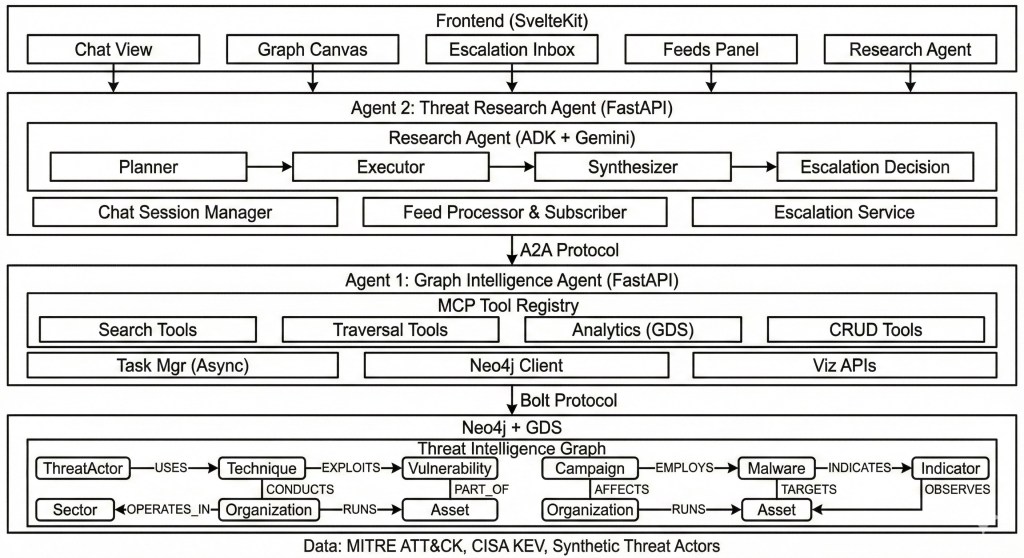
The architecture enables several key capabilities. The Research Agent (Agent 2) acts as an orchestrator. It receives analyst queries, plans research strategies, and delegates graph operations to the Graph Intelligence Agent (Agent 1) via A2A protocol. This separation allows each agent to use the most appropriate LLM and framework for its specialized task: Gemini with Google ADK for research synthesis and planning, Claude with LangChain for precise graph tool invocation.
Graph Data Schema in Neo4j
The knowledge graph schema is designed to answer the questions security analysts actually ask: “Who is targeting our industry (or company)?”, “What vulnerabilities does this campaign exploit?”, “What’s the attack path from this threat actor to our assets?”. Each entity type maps to a real-world concept in threat intelligence, and relationships capture the connections that matter for analysis.
Entities

APT (Advanced Persistent Threat), MITRE ATT&CK (Adversarial Tactics, Techniques, and Common Knowledge is a knowledge base developed by the MITRE Corporation, CVE (Common Vulnerabilities and Exposures.), CVSSD (Common Vulnerability Scoring System), and OCs (Indicators of Compromise).
Entity Relationships
The relationship schema captures how threat actors operate. A ThreatActor CONDUCTS Campaigns, USES Techniques, and TARGETS Sectors. Campaigns EMPLOY Malware and EXPLOIT Vulnerabilities. This structure enables powerful graph traversals e.g., from a single IOC, analysts can trace back through malware to campaigns to threat actors, or forward through vulnerabilities to affected software to organizational assets.
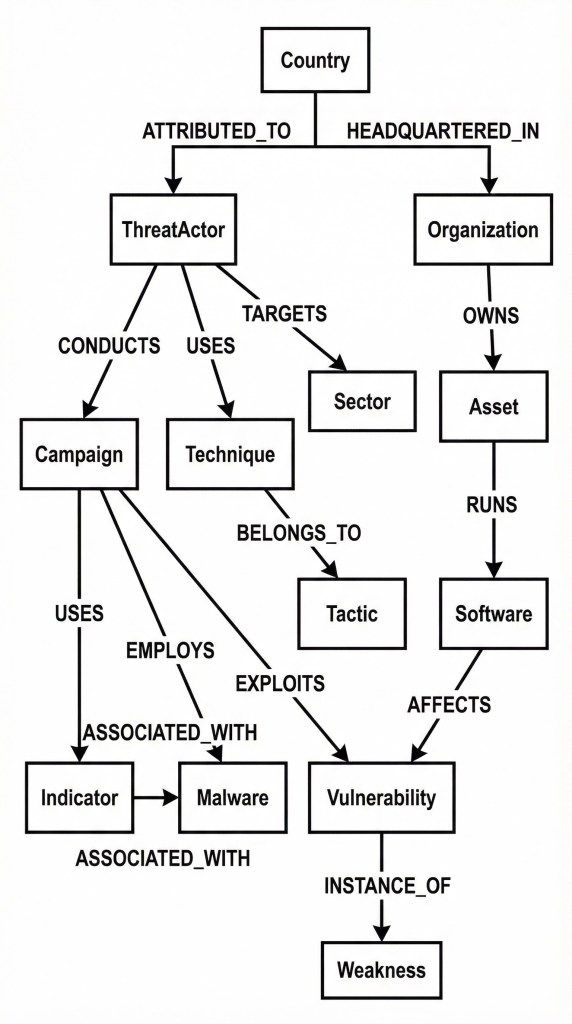
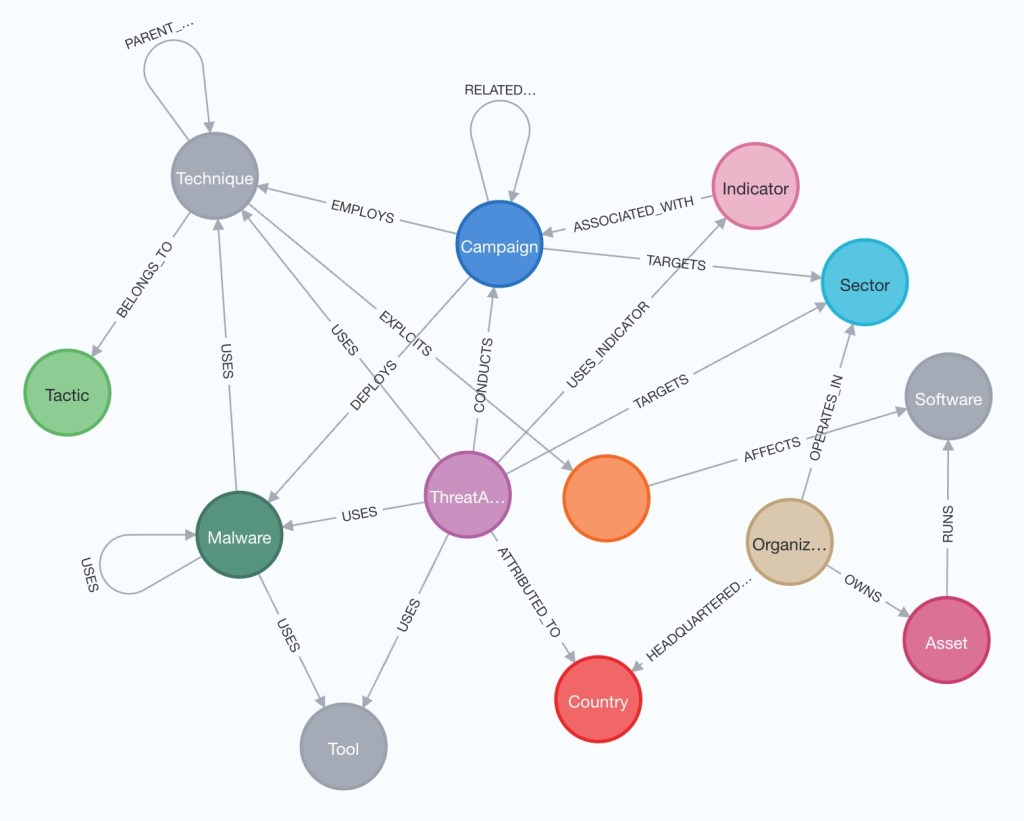
The graph is preloaded with authoritative threat intelligence data. MITRE ATT&CK provides the technique taxonomy (14 tactics, 200+ techniques, 400+ sub-techniques). CISA’s Known Exploited Vulnerabilities (KEV) catalog provides CVEs with real-world exploitation evidence. Synthetic threat actors, campaigns, and IOCs are generated with realistic metadata including CVSS scores, exploit maturity indicators, threat actor attribution with confidence weights, and temporal activity patterns.
Threat Intelligence Platform UI
The front-end is implemented using SvelteKit with TypeScript and Tailwind CSS, designed to support the workflows security analysts actually perform. The interface provides four primary views:
Research Chat provides a natural language interface for threat intelligence queries. Analysts ask questions like “Find critical vulnerabilities being actively exploited this month” and receive structured reports with confidence scores, executive summaries, key findings with severity ratings, and actionable recommendations. Responses include entity chips which are clickable references to threat actors, campaigns, CVEs, and IOCs. Chips embedded into LLM response enable seamless navigation to the Knowledge Graph or trigger a follow-up research.
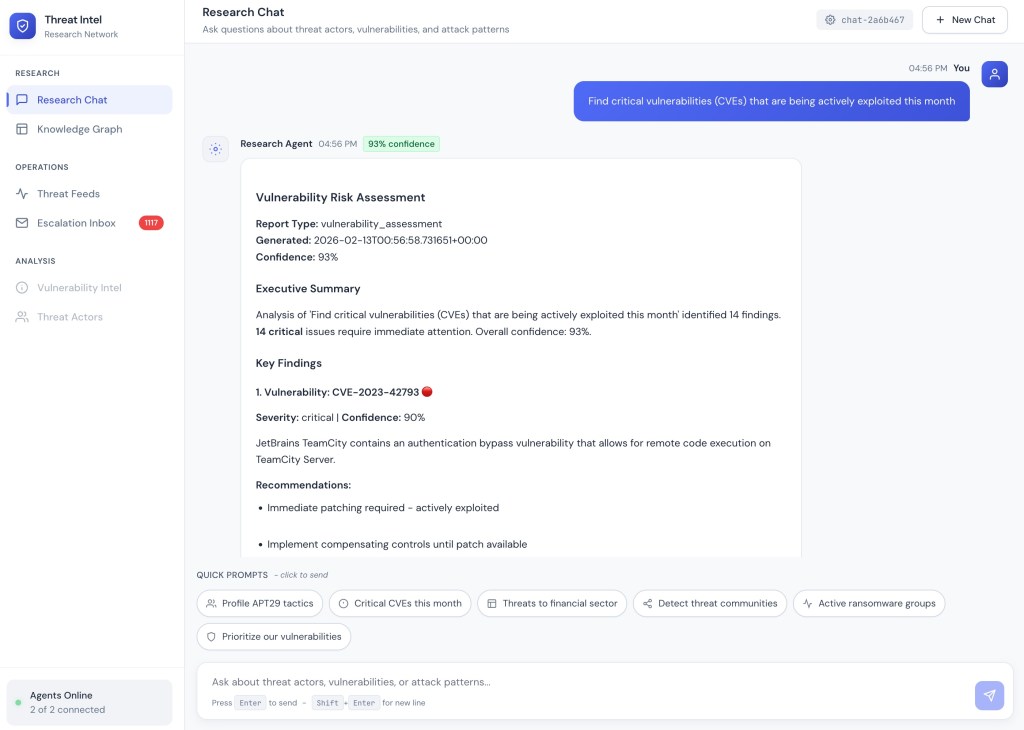
Research Chat: Analyst query returns a Vulnerability Risk Assessment with 14 critical findings, 93% confidence, and actionable recommendations.
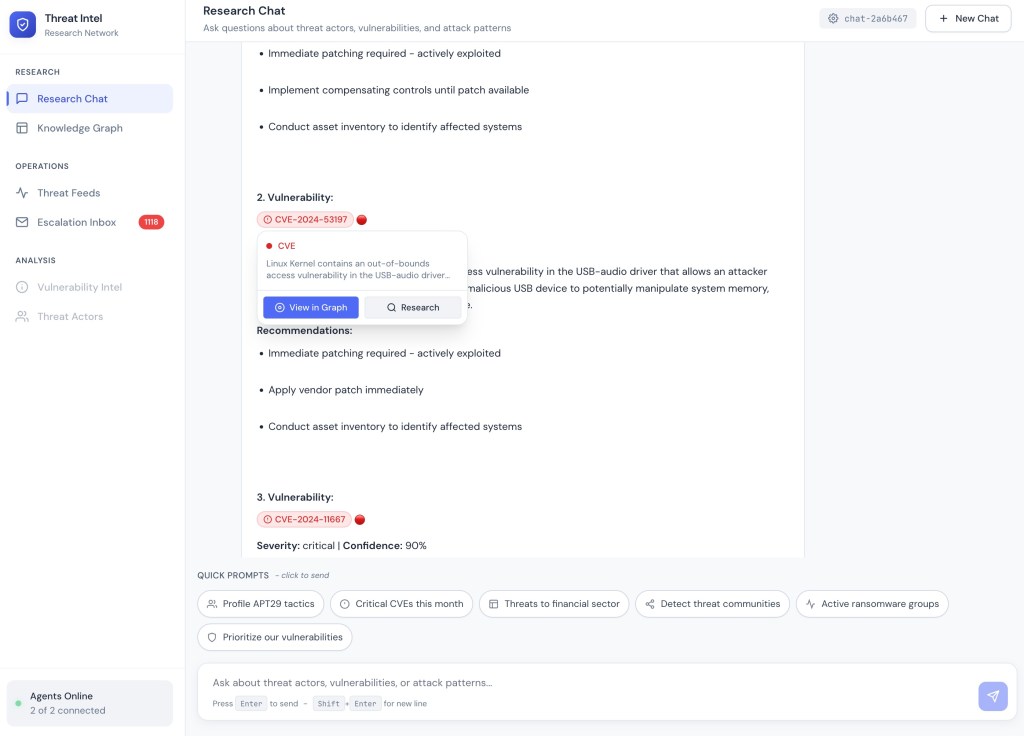
Entity Navigation: Clicking a CVE chip reveals a popup with description and options to view in Knowledge Graph or research further.
Knowledge Graph provides interactive graph visualization showing entity relationships. Analysts can filter by entity type (Actors, Campaigns, CVEs, IOCs, Techniques, Malware), adjust time ranges (7/14/30 days of recent activity), and toggle between Explore and Neighbors views. The entity detail panel shows attributes like CVSS scores, severity, exploit status, and related entities. Action buttons enable showing attack paths, researching in chat, or expanding connections.
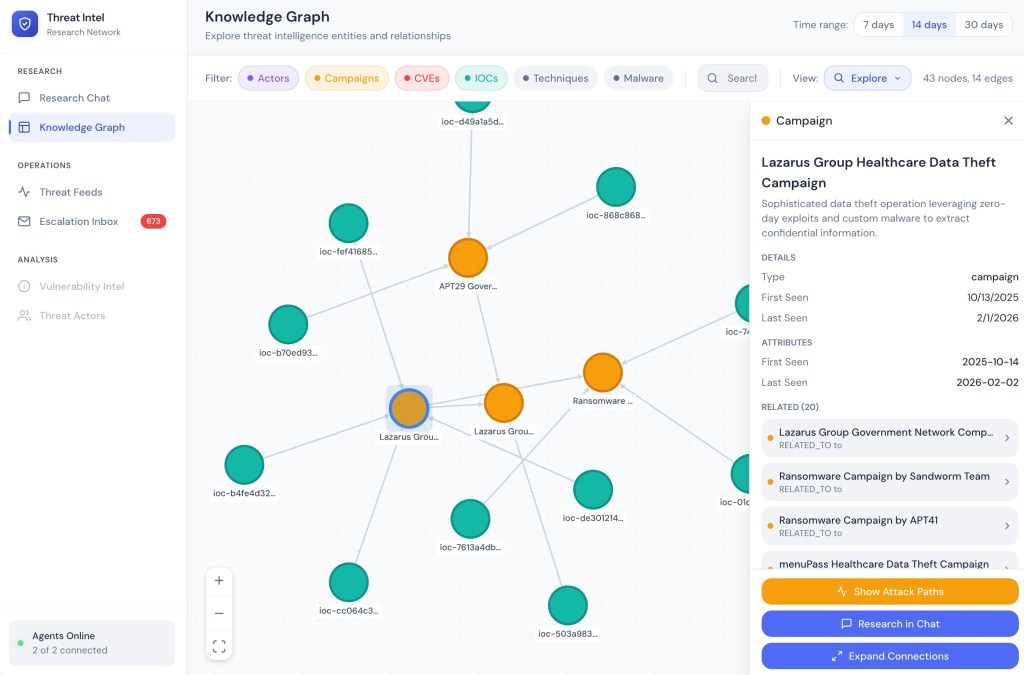
Knowledge Graph: Interactive visualization with entity filters, detail panel showing CVE attributes, and action buttons for attack path analysis.
Attack Path Visualization highlights exploitation chains between entities. When an analyst selects a threat actor or CVE and clicks “Show Attack Paths,” the system calculates paths through the graph showing how an attacker could reach their target. The visualization displays relationship labels (CONDUCTS, EMPLOYS, EXPLOITS) on edges, with a path selector allowing navigation between multiple discovered paths.
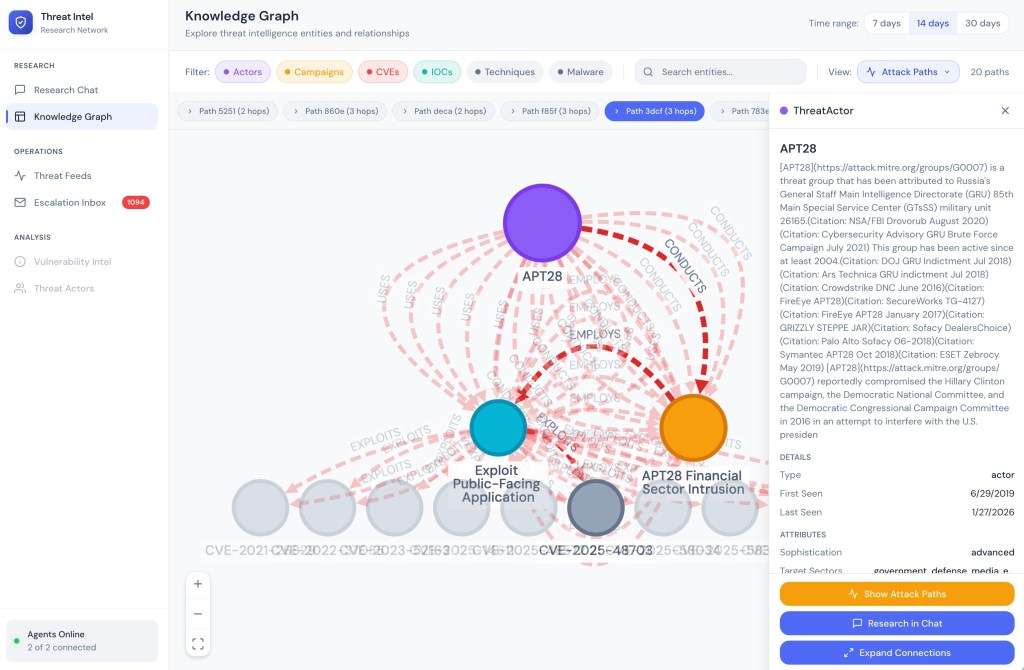
Attack Path: APT28 → Campaign → Technique → CVE visualization showing the exploitation chain with labeled relationships.
The attack path feature supports multiple query directions depending on the starting entity:
| Entity Type | Direction | What It Finds |
|---|---|---|
| ThreatActor | Forward | Actor → Campaign → Malware/Technique → CVE |
| Campaign | Forward | Campaign → Malware/Technique → CVE |
| CVE | Reverse | What exploits this CVE (Actors, Campaigns, Malware) |
| Indicator (IOC) | Reverse | What this IOC indicates (Actors, Campaigns) |
Escalation Inbox provides access to events the Research Agent has flagged for human review. Each escalation shows the original query, analysis summary with confidence breakdown, findings categorized by type and severity, and resolution options (Approve & Ingest, Reject, Defer). The expiration timer ensures time-sensitive intelligence doesn’t languish in the queue.
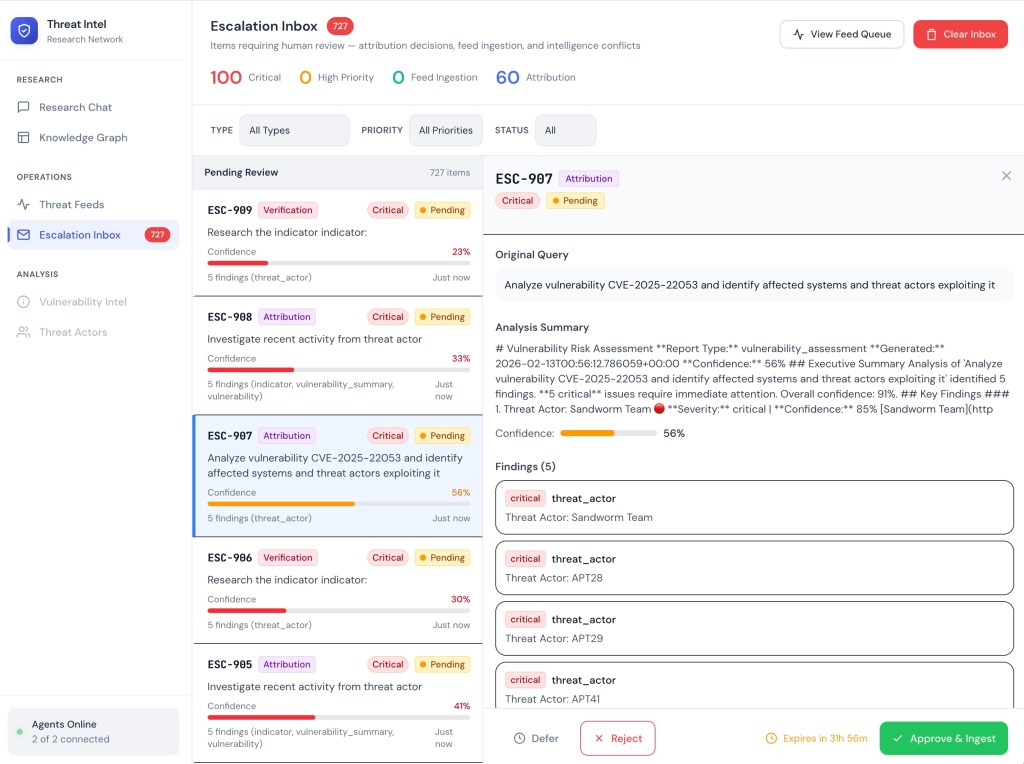
Escalation Inbox: 727 pending items with confidence indicators, finding summaries, and Defer/Reject/Approve actions with expiration timers.
Threat Feeds shows the live stream of events from external intelligence sources. Events flow in real-time via WebSocket with severity indicators (Critical, High, Medium) and type badges. The feed sources sidebar shows connection status for each source (OSINT Aggregator, Commercial Intel, CISA Alerts, Internal Sensors, FS-ISAC). Each event card includes a Research button that triggers investigation through the Research Agent.
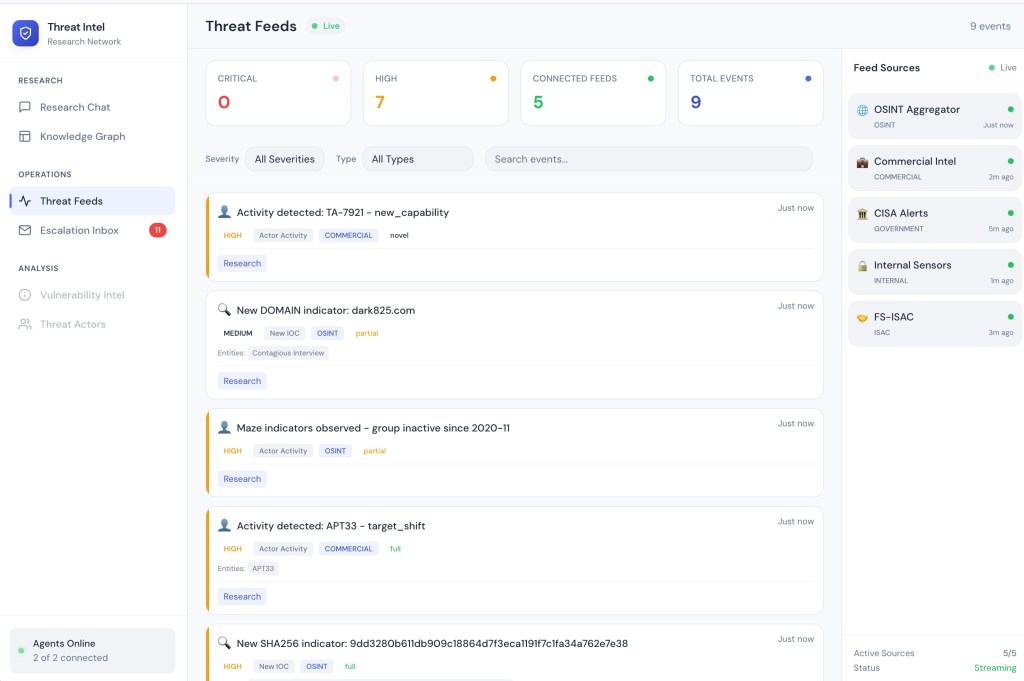
Threat Feeds: Live event stream with 3 critical and 67 high-severity events across 5 connected feeds, with Research buttons for each event.
User and Data Flows
1. Research Chat
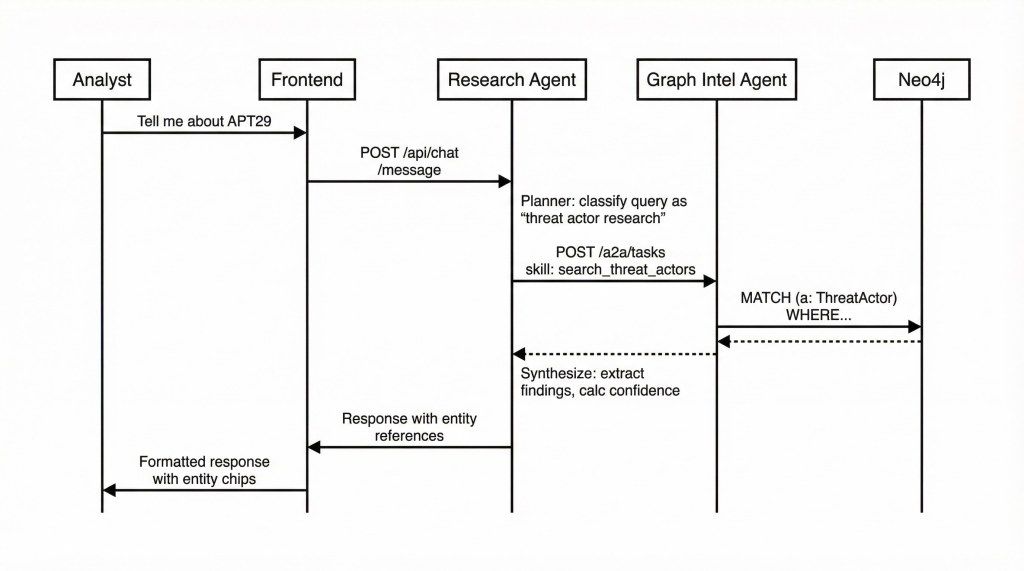
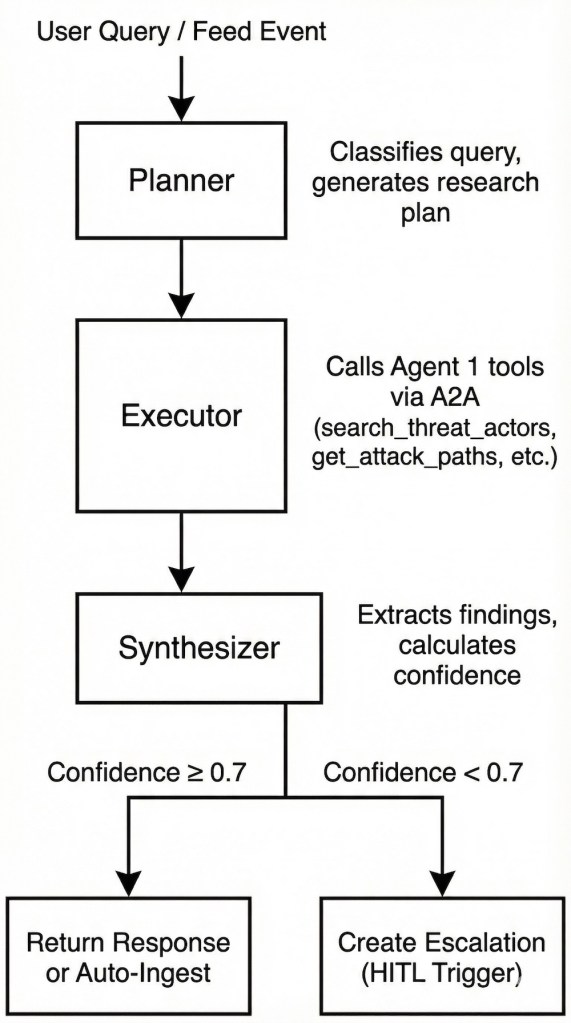
The Research Chat flow demonstrates A2A collaboration between agents. When an analyst asks about a threat actor, the query flows through the Research Agent’s planning, execution, and synthesis stages, with the Executor making A2A calls to the Graph Intelligence Agent for Neo4j queries.
2. Escalation Flow
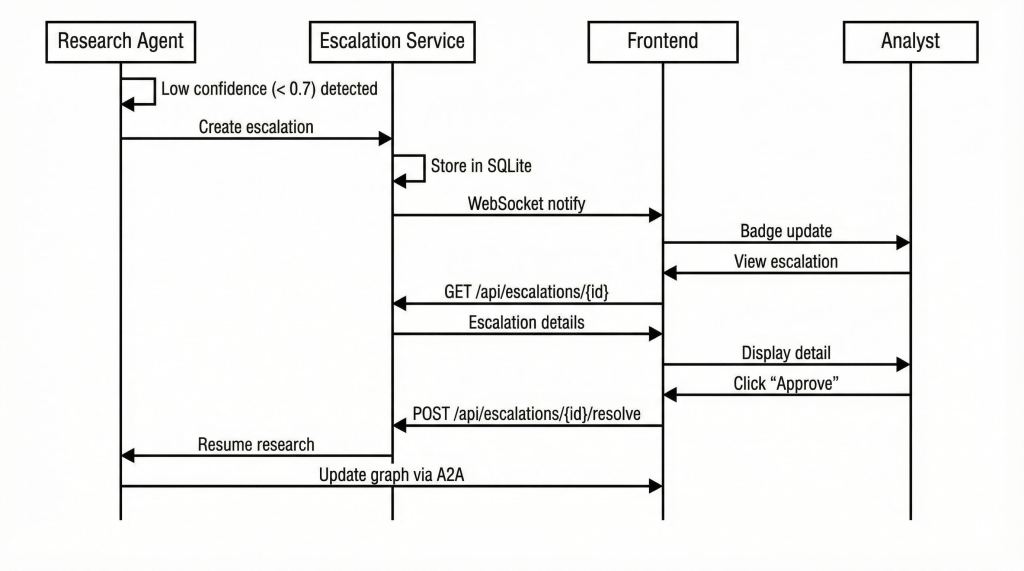
The escalation flow demonstrates the Human-in-the-Loop pattern. When the Research Agent processes a threat feed event and its synthesized confidence falls below the set 0.7 threshold, it creates an escalation rather than auto-ingesting or discarding. The analyst reviews, makes a decision, and the resolution feeds back to complete the research.
3. Threat Events Feed Processing Flow
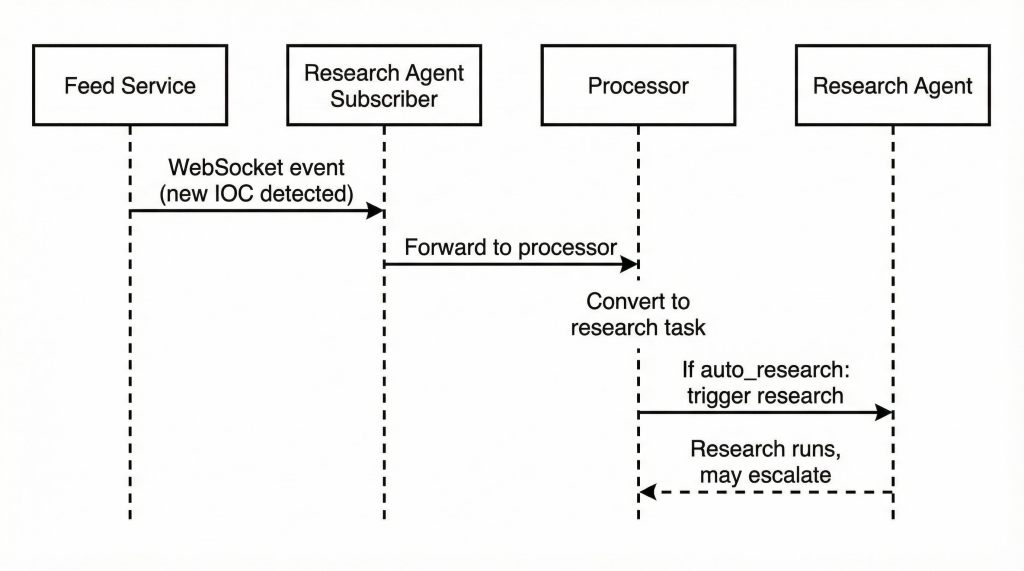
The feed processing flow shows how external threat intelligence enters the system. The Feed Service emits events via WebSocket. The Research Agent subscribes to these feeds, converts events to research tasks, and processes them by either auto-resolving high-confidence findings or escalating uncertain ones.
Threat Research Agent
The Threat Research Agent serves as the system’s research orchestrator and the primary interface for security analysts. Built with Google’s Agent Development Kit (ADK) and powered by Gemini, this agent specializes in query understanding, research planning, and synthesis, while delegating graph operations to the Graph Intelligence Agent via A2A protocol.
The agent operates in two modes. In interactive mode, it responds to analyst queries from the Research Chat, planning multi-step research, executing graph queries, and synthesizing findings into coherent responses with confidence scores. In feed processing mode, it subscribes to external threat intelligence streams, automatically processes incoming events, and either ingests validated intelligence or escalates uncertain findings for human review.
The key system design decision is the separation of research synthesis (i.e., what the Research Agent does) from graph operations (i.e., what the Graph Intelligence Agent does). This separation allows each agent to use the optimal LLM for its task. Gemini’s strength in planning and summarization versus Claude’s precision in structured tool invocation. The A2A protocol enables seamless collaboration between two agents.
Threat Research Agent Process Flow
What Triggers Low Confidence?
The system is designed so that escalations occur when they should i.e., when the evidence genuinely doesn’t support a confident conclusion. Rather than artificially lowering thresholds, the feed simulator generates events with characteristics that legitimately cause low confidence:
| Pattern | Description | Confidence Range |
|---|---|---|
| Ambiguous Attribution | Infrastructure overlaps with multiple threat actors at similar confidence levels | 0.25–0.45 |
| Source Conflict | Multiple reputable sources provide contradictory information | 0.30–0.50 |
| Insufficient TTP Correlation | Partial technique match, key distinguishing indicators missing | 0.35–0.55 |
| Shared Infrastructure | IOC hosted on bulletproof hosting used by many unrelated actors | 0.20–0.40 |
| Severity Dispute | CVSS scores differ significantly between NVD, vendor, and researchers | 0.40–0.60 |
| False Positive Candidate | Indicators match both malicious and legitimate services | 0.30–0.55 |
| Temporal Anomaly | Activity attributed to actor known to be dormant | 0.20–0.35 |
| Unverified Entity | Single-source intelligence about previously unknown threat actor | 0.15–0.30 |
Escalation Service Implementation
When confidence drops below threshold, the Escalation Service creates a structured escalation with type classification, priority determination, and resolution options:
# From app/escalation/service.py

class EscalationType(str, Enum):
    """Types of escalations that can be triggered."""
    ATTRIBUTION_UNCERTAINTY = "attribution_uncertainty"
    NOVEL_TECHNIQUE = "novel_technique"
    FALSE_POSITIVE_REVIEW = "false_positive_review"
    SEVERITY_OVERRIDE = "severity_override"
    INTELLIGENCE_CONFLICT = "intelligence_conflict"
    HIGH_IMPACT_VERIFICATION = "high_impact_verification"

# Escalation timeout configuration (hours until auto-expire)
ESCALATION_TIMEOUTS: dict[EscalationType, int] = {
    EscalationType.ATTRIBUTION_UNCERTAINTY: 24,
    EscalationType.NOVEL_TECHNIQUE: 48,
    EscalationType.FALSE_POSITIVE_REVIEW: 12,
    EscalationType.SEVERITY_OVERRIDE: 4,
    EscalationType.INTELLIGENCE_CONFLICT: 24,
    EscalationType.HIGH_IMPACT_VERIFICATION: 2,
}
The create_from_research method packages research context for analyst review:
async def create_from_research(
    self,
    research_session: "ResearchSession",
    chat_session: "ChatSession",
) -> dict[str, Any]:
    """Create an escalation from a low-confidence research session."""

    # Determine escalation metadata
    escalation_type = self.determine_escalation_type(research_session)
    priority = self.determine_priority(research_session)

    # Build task context for resumption after resolution
    task_context = {
        "task_id": research_session.session_id,
        "session_id": chat_session.session_id,
        "original_query": research_session.query,
        "completed_steps": completed_steps,
        "pending_steps": pending_steps,
    }

    # Build analysis summary from findings
    analysis_summary = {
        "findings": findings[:5],  # Top 5 findings
        "confidence": research_session.confidence,
        "report_summary": research_session.report.to_markdown()[:500],
    }

    # Create with type-specific timeout
    expiry_hours = ESCALATION_TIMEOUTS.get(escalation_type, 48)

    # Persist and publish event for WebSocket notification
    escalation = await repo.create(...)
    await self._publish_event("escalation_created", escalation)
    return escalation
Feed Event Processing
The Feed Event Processor converts incoming threat intelligence events into research tasks:
# From app/feeds/processor.py

async def process_event(self, event: dict[str, Any]) -> FeedResearchTask | None:
    """Process a feed event and optionally trigger research."""

    event_data = event.get("data", {})
    event_id = event_data.get("event_id", "unknown")

    # Derive research query from event type
    query = self._derive_research_query(event_data)

    # Create task with escalation metadata (for confidence capping)
    task = FeedResearchTask(
        event_id=event_id,
        event_type=event_data.get("event_type"),
        query=query,
        event_requires_escalation=event_data.get("requires_escalation", False),
        event_agent_confidence=event_data.get("agent_confidence"),
    )

    # Queue for processing if auto-research enabled
    if self._auto_research and self._agent:
        await self._queue.put(task)

    return task
The query derivation maps event types to appropriate research questions:
def _derive_research_query(self, event_data: dict[str, Any]) -> str | None:
    """Derive a research query from feed event data."""

    event_type = event_data.get("event_type", "")
    payload = event_data.get("payload", {})

    if event_type == "cve_published":
        cve_id = payload.get("cve_id", "")
        return f"Analyze vulnerability {cve_id} and identify affected systems and threat actors exploiting it"

    elif event_type == "actor_activity":
        actor_name = payload.get("actor_name", "")
        activity_type = payload.get("activity_type", "")
        return f"Investigate recent {activity_type} activity from threat actor {actor_name}"

    elif event_type == "sector_alert":
        sector = payload.get("sector", "")
        alert_type = payload.get("alert_type", "")
        return f"Analyze {alert_type} threats targeting the {sector} sector"

    # ... additional event types
Research Agent API Endpoints
| Endpoint | Method | Description |
|---|---|---|
| /health | GET | Health check with dependency status |
/api/chat/message | POST | Send message, receive response |
| /api/chat/sessions | GET | List chat sessions |
/api/chat/sessions/{id} | GET | Get session history |
| /ws/chat/{session_id} | WebSocket | Real-time chat updates |
| /api/escalations | GET | List escalations with filters |
| /api/escalations/{id} | GET | Get escalation details |
| /api/escalations/{id}/resolve | POST | Submit resolution (approve + ingest) |
| /api/escalations/{id}/reject | POST | Reject escalation (discard) |
| /api/escalations/{id}/defer | POST | Defer for later analysis |
/api/escalations/stats | GET | Dashboard statistics |
| api/feeds/status | GET | Feed subscription status |
| /api/feeds/tasks | GET | Feed-triggered research tasks |
Graph Intelligence Agent
The Graph Intelligence Agent is the system’s knowledge backbone. It is a specialized agent that encapsulates all Neo4j operations behind well-defined tool interfaces. Built with LangChain and Claude, this agent translates high-level requests (“find threat actors targeting healthcare”) into optimized Cypher queries, executes Graph Data Science algorithms, and manages knowledge graph CRUD operations.
What makes this agent architecturally important is its dual role. As an MCP Server, it exposes graph tools that can be used by any MCP-compatible client, making the threat intelligence graph accessible beyond this specific application. As an A2A Server, it enables the Research Agent (and potentially other agents) to discover its capabilities and invoke them through the standard A2A task protocol.
This dual-protocol design means the Graph Intelligence Agent can be reused across different contexts. An MCP client like Claude Desktop could query the threat intelligence graph directly. A different research agent built with a different framework could discover and use the same tools via A2A. The knowledge graph becomes a shared resource rather than being locked into a single application.
Graph Intel Agent as A2A Server
The agent advertises its capabilities via an Agent Card at the standard /.well-known/agent.json endpoint. When the Research Agent sends a task request, the A2A router validates the skill, executes the corresponding MCP tool, and returns results:
# From app/a2a/router.py

@router.post("/a2a/tasks", response_model=A2ATaskResponse)
async def create_task(request: A2ATaskRequest, req: Request):
    """Create and execute an A2A task."""

    # Validate skill exists in registry
    if not is_valid_skill(request.skill):
        return A2ATaskResponse(
            task_id="invalid",
            status="Failed",
            error={
                "code": "INVALID_SKILL",
                "message": f"Unknown skill: {request.skill}",
                "available_skills": get_available_skills(),
            },
        )

    # Determine sync vs async execution
    run_async = request.async_execution or request.skill in ASYNC_DEFAULT_SKILLS

    if run_async:
        # Submit for background execution (GDS algorithms, complex traversals)
        task_state = await task_manager.submit_task(
            skill=request.skill,
            parameters=request.parameters,
            executor=executor,
            timeout=request.timeout,
        )
        return A2ATaskResponse(task_id=task_state.task_id, status="Running", ...)

    # Synchronous execution for fast operations
    result = execute_tool(neo4j, request.skill, request.parameters)
    return A2ATaskResponse(
        task_id=task_state.task_id,
        status="Completed",
        artifacts=[{"mimeType": "application/json", "data": result}],
    )
Graph Intel Agent as MCP Server
The MCP tool registry maps skill IDs to their implementations and handles parameter transformation:
# From app/tools/registry.py

TOOL_REGISTRY: dict[str, ToolFunction] = {
    # Search tools
    "search_threat_actors": search_threat_actors,
    "search_vulnerabilities": search_vulnerabilities,
    "search_indicators": search_indicators,
    # Traversal tools
    "get_attack_paths": get_attack_paths,
    "get_affected_assets": get_affected_assets,
    "trace_campaign_infrastructure": trace_campaign_infrastructure,
    # Analytics tools (GDS-based)
    "detect_threat_communities": detect_threat_communities,
    "calculate_vulnerability_criticality": calculate_vulnerability_criticality,
    "find_similar_campaigns": find_similar_campaigns,
    "identify_key_techniques": identify_key_techniques,
    # Predictive tools
    "predict_likely_targets": predict_likely_targets,
    "predict_technique_adoption": predict_technique_adoption,
    # CRUD tools
    "create_indicator": create_indicator,
    "update_threat_assessment": update_threat_assessment,
    "link_entities": link_entities,
}

def execute_tool(client: Neo4jClient, skill_id: str, parameters: dict) -> dict:
    """Execute a tool by skill ID with given parameters."""

    if skill_id not in TOOL_REGISTRY:
        raise ValueError(f"Unknown skill: {skill_id}")

    tool_func = TOOL_REGISTRY[skill_id]
    transformed_params = transform_parameters(skill_id, parameters)

    return tool_func(client, **transformed_params)
The full MCP tool catalog:
| Tool | Category | Description |
|---|---|---|
| search_threat_actors | Search | Find actors by name, country, sector |
| search_vulnerabilities | Search | Find CVEs by ID, CVSS, exploit status |
| search_indicators | Search | Find IOCs by type, value |
| get_attack_paths | Traversal | Actor → Target pathfinding using Dijkstra |
| get_affected_assets | Traversal | Vulnerability impact analysis |
| trace_campaign_infrastructure | Traversal | C2, domains, malware mapping |
| detect_threat_communities | GDS | Louvain / Label Propagation clustering |
| calculate_vulnerability_criticality | GDS | Contextual CVSS scoring using PageRank |
| find_similar_campaigns | GDS | Node similarity via shared technique |
| identify_key_techniques | GDS | Betweenness centrality for technique importance |
| predict_likely_targets | Prediction | Link prediction for targeting |
| predict_technique_adoption | Prediction | Technique adoption likelihood |
| create_indicator | CRUD | Add new IOC to graph |
| update_threat_assessment | CRUD | Update risk scores |
| link_entities | CRUD | Create relationships |
The GDS (Graph Data Science) tools deserve special attention. These aren’t simple lookups—they run algorithms that leverage the full graph structure. detect_threat_communities uses Louvain community detection to find clusters of related threats that might not be obvious from individual relationships. calculate_vulnerability_criticality combines CVSS scores with graph centrality to prioritize vulnerabilities that are both severe and widely connected to threat infrastructure.
Direct API endpoints bypass the agent layer for fron-tend graph visualization, providing fast access for interactive exploration:
| Endpoint | Description |
|---|---|
| /api/graph/recent | Get entities active within N days (7/14/30 day toggles) |
| /api/graph/entity/{id} | Full entity details including all properties and relationships |
| /api/graph/expand/{id} | 1-hop neighbor expansion for interactive exploration |
| /api/graph/search | Text search across all entity types |
| /api/graph/path | Attack path visualization between two entities |
Conclusion
Building the Threat Intelligence Platform validated several key insights about multi-agent architectures.
Protocol-based collaboration scales better than monolithic agents. The MCP and A2A protocols create clean boundaries between agents. The Graph Intelligence Agent doesn’t need to know anything about research synthesis; the Research Agent doesn’t need to understand Neo4j. Each agent evolves independently while the protocols ensure they can still collaborate.
Human-in-the-loop works best when humans genuinely belong in the loop. The escalation patterns aren’t artificial checkpoints, rather they need to represent scenarios where algorithmic certainty is impossible. Ambiguous attribution, conflicting sources, and novel threats are problems that require human judgment. The system routes these cases to analysts while handling routine intelligence automatically.
Graph databases unlock questions relational databases can’t answer. “What’s the shortest path from this threat actor to our critical assets?” “Which techniques are most central to campaigns targeting our industry?” These questions require graph traversal and GDS algorithms. The schema design (i.e., mapping threat intelligence concepts to nodes and relationships) determines what questions the system can answer.
The Threat Intelligence Platform isn’t the only system that benefits from this architecture. The patterns such as MCP for tool exposure, A2A for agent collaboration, HITL for uncertainty routing, and graph databases for relational domains also apply to other use cases:
- Clinical Trial Patient Matching: Model relationships between trials, eligibility criteria, patient conditions, medications, and biomarkers. Research agents identify candidates; HITL escalates edge cases requiring clinical judgment.
- Investment Due Diligence: Model relationships between companies, investors, executives, regulatory filings, and risk indicators. Research agents discover hidden connections and conflicts of interest; analysts review suspicious patterns.
- Supply Chain Risk Analysis: Model relationships between suppliers, components, manufacturing locations, and risk factors. Agents monitor for disruptions; HITL escalates geopolitical risks requiring human assessment.
In each case, the domain is inherently relational, agents benefit from specialization and collaboration, and human judgment is genuinely required for certain decisions.
The code for the Threat Intelligence Platform is available at GitHub. Stay tuned for deeper dives into specific implementation details: MCP tool design patterns, A2A task orchestration, and GDS algorithm selection for threat intelligence.
 Igor's Musings About Technology