

Most LLM tools forget what you taught them last week. ENGRAM Knowledge Hub turns your conversations, documents, and research into a personal knowledge graph with recall by relevance, not recency.
You spent two hours yesterday comparing memory architectures for LLM agents. You read three papers, sketched an architecture, talked through tradeoffs with your assistant. Today you start a new chat about retrieval strategies. Does any of that come back?
In most LLM tools, no. The thread is in your history, but history is a transcript, not memory. The next time the topic comes up, you start from zero, or you copy-paste fragments back into the prompt, or you give up and re-derive what you already figured out last week.
This isn’t a small annoyance. Knowledge work happens in conversations, and the structured thinking that comes out of those conversations such as the comparisons, the architecture sketches, the literature reviews, is exactly the kind of thing that should compound over time. Instead it scrolls away.
ENGRAM Knowledge Hub is what I built to fix that. It’s a personal research assistant with three connected ideas:
- Conversations get distilled into a personal knowledge graph that survives across sessions.
- Structured research artifacts (articles, document analyses, web research) are persisted as first-class entities in that same graph.
- The graph drives retrieval for future queries, so what you’ve already learned biases what comes back.
This post is a tour of the system at the conceptual level: what it does, why it’s designed the way it is, and where it fits alongside the LLM tools you already use. If you want the deeper technical posts on the underlying memory architecture, I’ll link to those at the relevant points.
The problem: conversations don’t compound
LLM tools today have two modes for handling prior context, and neither is really memory:
- Conversation history – a transcript scrollback you can re-open. Useful if you remember the chat existed and remember what to search for. Useless for “what did I learn about X across the last six months?”
- RAG over documents – semantic retrieval over a static corpus. Good for “what does this PDF say?” Bad for “what have I personally figured out about this topic?”
What’s missing is the part in the middle: a representation of your accumulated thinking that grows automatically and gets retrieved automatically. The graph that connects “the architecture I sketched on Tuesday” to “the paper I read on Wednesday” to “the question I’m asking right now.”
Building that is what ENGRAM is about. The first three posts in this series (Part 1, Part 2, Part 3) cover the underlying retrieval mechanics, document ingestion, and the hippocampus-inspired memory pipeline. The Knowledge Hub adds a layer on top: a personal knowledge base that wraps all of this in a product you can actually use day-to-day.
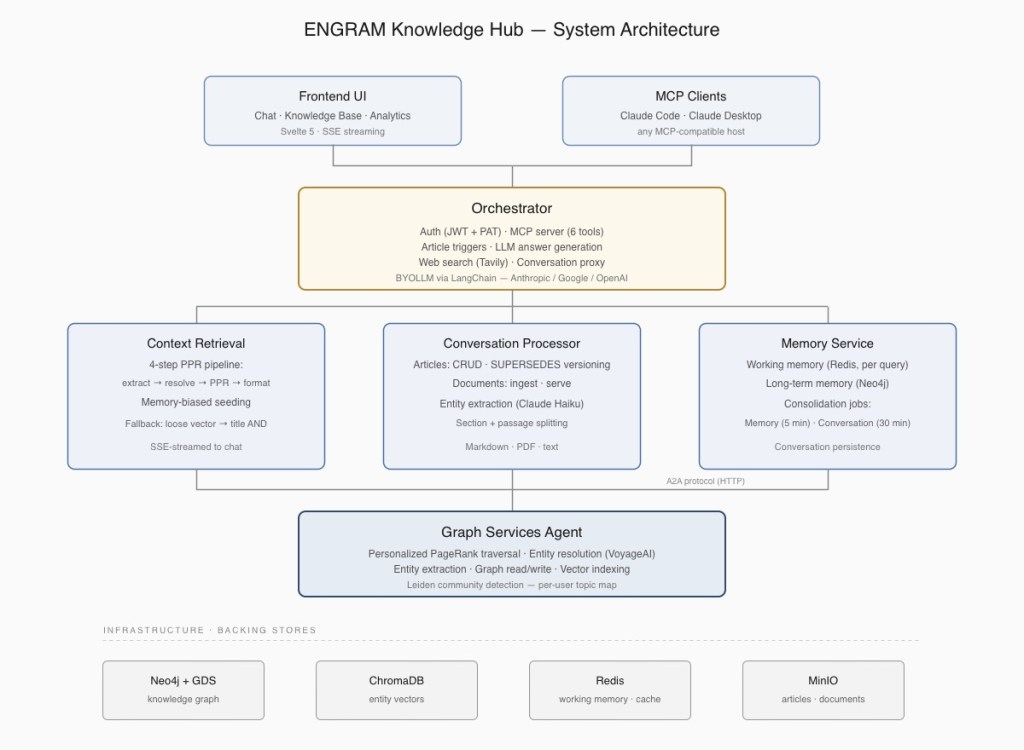
A few things worth noticing about the architecture:
- The graph (Neo4j, with vector indices in ChromaDB) is the single source of truth. Conversations, articles, attached documents, and consolidated memories all live in it as connected nodes.
- Retrieval is unified. There’s no “search the KB” vs. “search my chats” as Personalized PageRank traverses the whole graph and surfaces whatever is most relevant, regardless of source type.
- The MCP server is co-located with the Orchestrator service, so external AI agents (Claude Code, Claude Desktop, etc.) write into exactly the same audit trail and graph that chat-driven actions produce. No separate ingestion path, no sync drift.
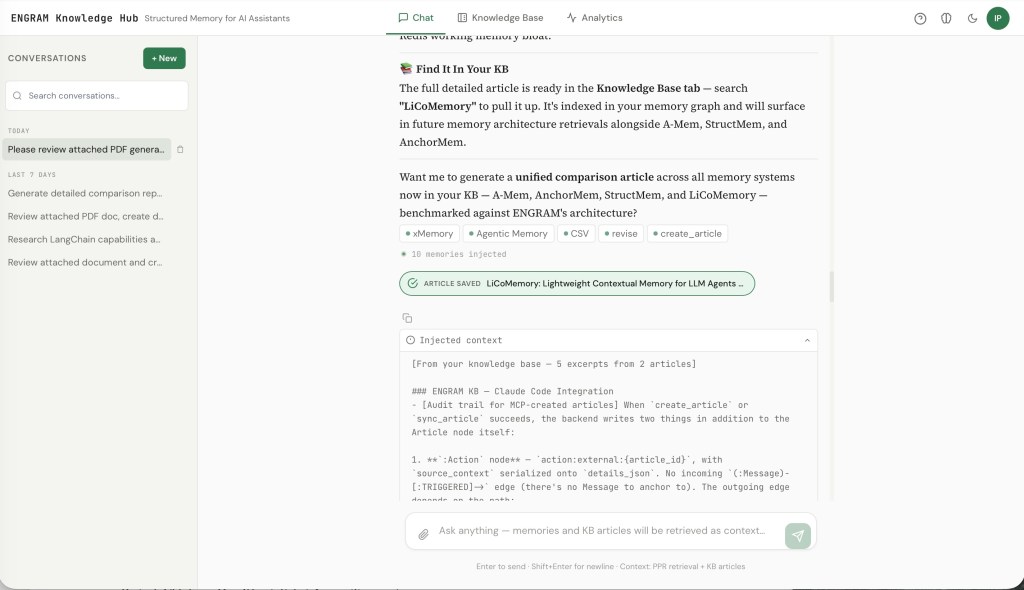
A chat session in ENGRAM: Before the assistant responds, the system has already pulled 5 excerpts from 2 prior articles into context — selected by graph traversal, not by scrolling history. The entity chips below show which NounPhrase nodes the query activated.
Memory that compresses ~1000:1
The hard problem with personal memory in LLM systems isn’t capturing things, but it’s selecting what to bring back. A naive approach (stuff the last N turns into the prompt) fails the moment a useful fact is older than N. A slightly less naive approach (vector-search the transcript) returns surface-similar fragments without the structural relationships that make them useful.
ENGRAM takes a different route, modeled on how the hippocampus is currently understood to handle episodic-to-semantic consolidation. The mechanics are described in detail in Part 3 of the series and in this follow-up post on why graph memory beats summarization. In summary:
- Working memory captures per-message observations as Redis-cached “memory clusters” tied to extracted entities.
- Consolidation runs every five minutes, merging clusters into long-term
Memorynodes in the graph and linking them to theNounPhraseentities they’re about. - Retrieval uses Personalized PageRank (PPR) seeded from the entities in the current query, traversing the graph and scoring reachable memories by their structural relevance, instead of just their lexical similarity.
A second seeding signal (what we call the “memory phase”) biases PPR toward entities you’ve engaged with heavily before. If you’ve spent the last month deep in retrieval architectures, a question that brushes against that topic will pull in the right context even when the lexical overlap is weak.
The compression ratio is the headline number: roughly 1,000:1 between raw conversation tokens and the structured graph that survives. A query injects 1,500–3,000 tokens of context selected by graph traversal, regardless of how many millions of tokens your conversation history actually contains. That’s what makes “remembering” something the system can actually do across months of interaction without exhausting the context window.
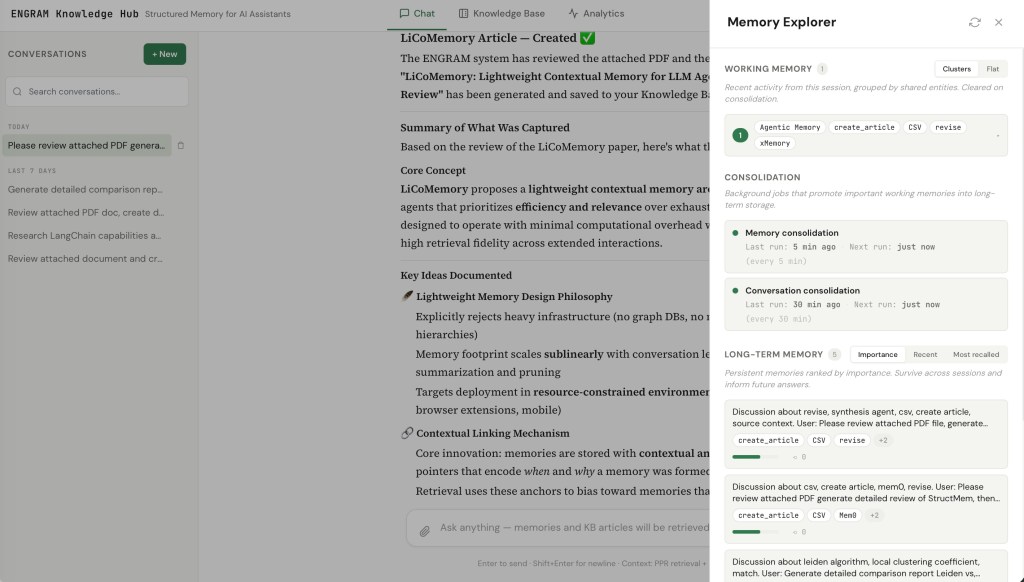
The Memory Explorer panel: Working memory clusters (top) show what the next consolidation tick will act on, the scheduler row (middle) shows when memory and conversation consolidation last ran and when they next will, and long-term memories (bottom) are ranked by importance with their entity chips and recall counts.
The Memory Explorer panel makes this whole pipeline inspectable. You can see what’s currently in working memory, when consolidation last ran, and which long-term memories rank highest by importance. For technical users this matters because the system isn’t a black box. For execs it matters because trustability of AI memory is a real concern thus, being able to look at what was remembered (and why) addresses it directly.
Articles as first-class graph entities
Memories are great for “what did we discuss about X,” but they’re compressed by design. Sometimes the right artifact is a full structured document such as a comparison report, an architecture analysis, or a literature review that you want to keep verbatim, browse, share, and have participate in future retrieval.
That’s what KB articles are.
You create one with a phrase in chat, like:
"Research popular vector databases and create comparison report in the KB"
Or if you want to be precise about article title or data source for the report, you can use available commands to guide ENGRAM:
"Create article: Comparison of popular vector databases :from: library
ENGRAM will create new article with suggested title using only information available in the Knowledge Hub library, but not using web search to get it.
Or by attaching a PDF document and asking for an analysis. Or by asking for web research. The orchestrator detects the intent (canonical phrases first, regex fallback, LLM classifier as a last resort), generates the article with your configured LLM, and persists it as:
- A markdown blob in object storage (rendered in the article viewer).
- A graph sub-graph:
Article → Section → Passage → NounPhrase, with entity extraction running on every passage. - An audit-trail
Actionnode linked to the conversation message that triggered it.
From that point on, the article isn’t just sitting in a folder. Its passages share NounPhrase nodes with your conversation memories and any attached documents, which means PPR retrieval pulls the article’s relevant sections into future queries automatically. Ask a question three months later that brushes against the topic, and the right paragraphs come back alongside your memory summaries.
A few design choices worth calling out:
- Articles are immutable. Updates create a new version with a
SUPERSEDESedge to the prior one. This keeps the graph append-only (matching how memory consolidation already works) and gives you full version history without mutable-state bugs. - Visibility is per-article. Default is private – only creator can see. But you can flip an article to public, at which point it surfaces in any ENGRAM user’s PPR retrieval. (Documents are one-way private→public, to prevent breaking shared references.)
- Five sources drive article generation:
conversation(default – chat history + retrieved memories),last response,library(your existing articles + attached documents),web(ENGRAM uses Tavily-backed search), andattached(a specific document you’ve uploaded).
Five internal sources drive article generation, ranging from chat history to web search to specific attachments. The trigger phrase is the same; the content stream varies. But in every case, ENGRAM is doing the generation, with content it can reach itself.
A sixth path takes a deliberately different shape. MCP clients write articles in. An external agent such as Claude Code reading a project file, Claude Desktop summarizing an email thread, a future agent operating against a Support database or external CMS composes the article using its own LLM and content access, then hands the finished markdown to ENGRAM via create_article or sync_article. ENGRAM owns persistence, entity extraction, and graph integration while the external host owns the source access and the generation.This was a deliberate choice: it lets the KB consolidate content from systems ENGRAM doesn’t (and shouldn’t need to) directly connect to, while still routing every write through the same audit trail and retrieval graph as chat-driven articles.
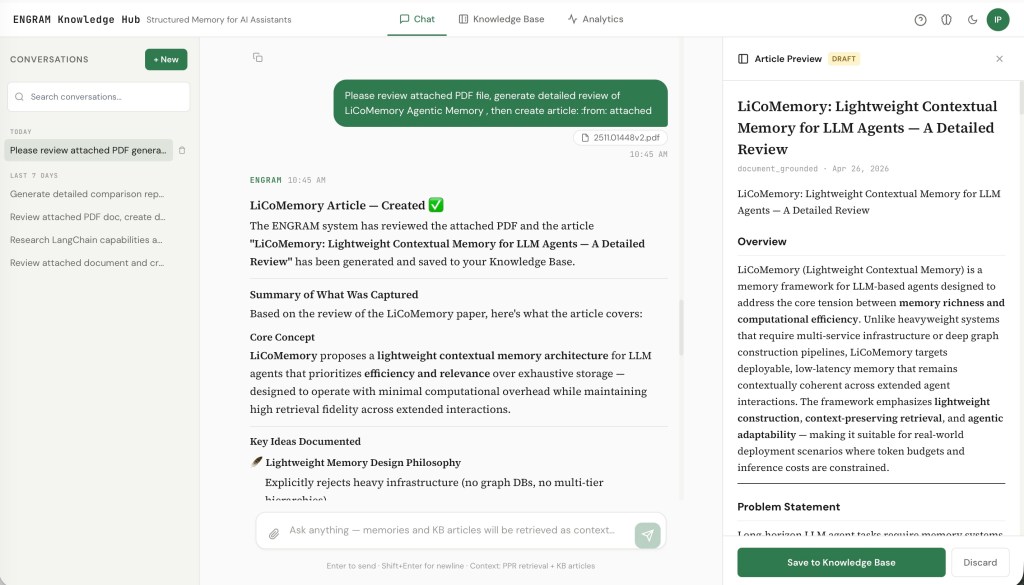
A document-grounded article in draft state: The user attached a PDF and asked for a summary report; ENGRAM generated the article and slid the preview in from the right. Nothing is committed to the graph until the user clicks Save — assistant suggestions are always opt-in.
Three views over the same graph
A knowledge base that you can’t browse is just a database. ENGRAM Knowledge Hub provides three complementary views, all rendered over the same underlying graph:
KB Overview – a topic map of your knowledge
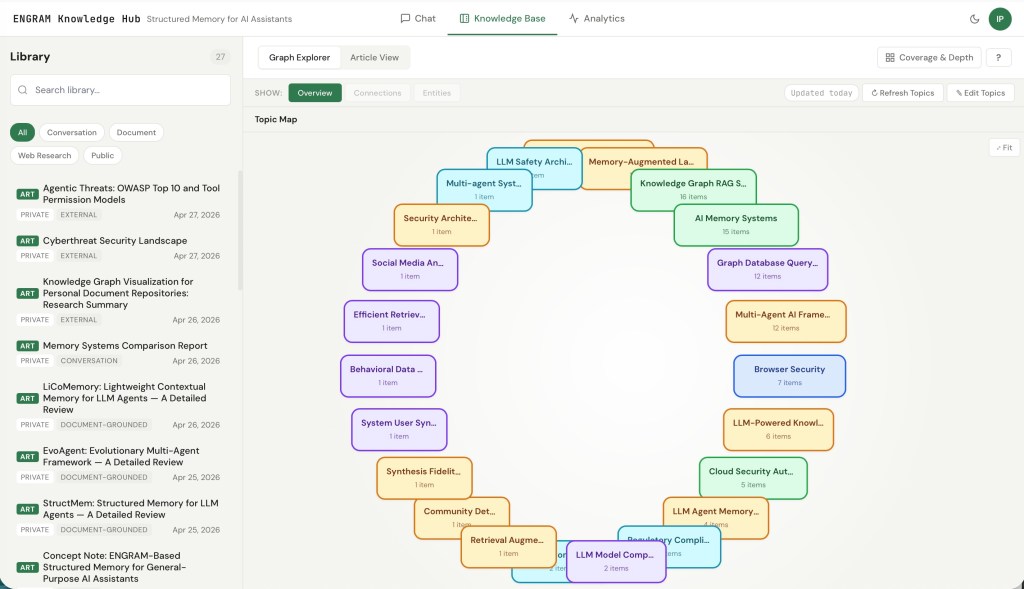
The KB Overview. Each rounded rectangle is a topic community detected by Leiden clustering over the user’s NounPhrase co-occurrence graph. Size reflects the number of articles and documents in the topic; edges show inter-topic overlap (shared entities).
The Overview is a per-user topic map driven by Leiden community detection over your NounPhrase co-occurrence sub-graph. Nodes get clustered into communities at two levels of resolution (coarse and fine), and each community gets a label generated by a small LLM pass. The result is a bubble canvas where each rounded rectangle is a topic, sized by the number of articles and documents in it, with edges showing inter-topic overlap.
You drill: click an a rounded rectangle for a top-level topic to see its sub-topics. Click on a sub-topic to reach the Leaf view which is a bipartite canvas showing the article in the topic community on one side and the entity satellites that hold them together on the other. Clicking a NounPhrase highlights articles that contain it; selecting several NounPhrases AND-filters the highlight, leaving only items that contain all of them.
The Leaf view of a topic community, with the AND-additive filter engaged. Selecting Neo4j highlights only the items in this community that mention it; selecting additional entities tightens the filter further. This is the visual analog of what PPR is doing under the hood – items stay lit precisely when they share the entities you’ve activated.
The clustering uses a fixed random seed, so re-running detection produces stable layouts. We also do a Jaccard stability match between refresh runs: a community whose membership overlaps an existing one above a threshold inherits the prior community’s ID and any custom topic label you’d set. This means re-running detection doesn’t shuffle your topic map every time, and the labels you’ve manually edited stick around even as the underlying graph grows.
Entities View – what’s in this article?
A bipartite view: an article or document on the left, every extracted entity on the right (with mention counts when greater than one). Useful for “what’s actually covered in here” and for catching extraction errors.
Connections View – what links to what?
The Connections view is the one I keep coming back to if I need to see articles about specific topics. It’s a tripartite view: a selected article on the left, the entities that article shares with other content in the middle, and the connected articles/documents on the right.
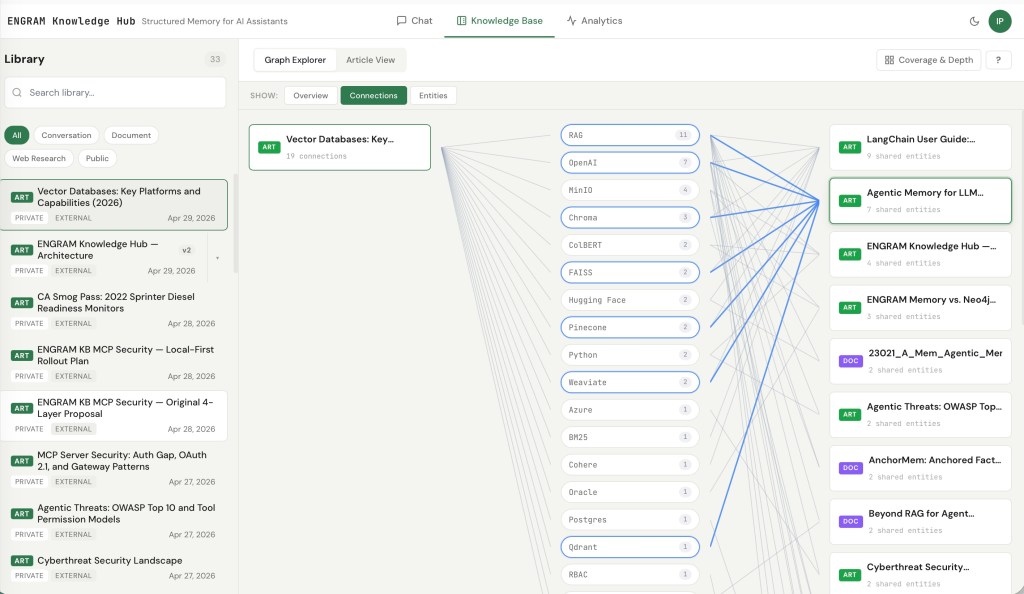
The interaction that makes it work is the same AND-additive filter shown in the Leaf view above, but applied article-by-article: clicking middle pills filters the right column to only the articles and documents that share all the selected entities with the one you’re viewing. Pick three entities, and the right column dims everything that doesn’t satisfy all three.
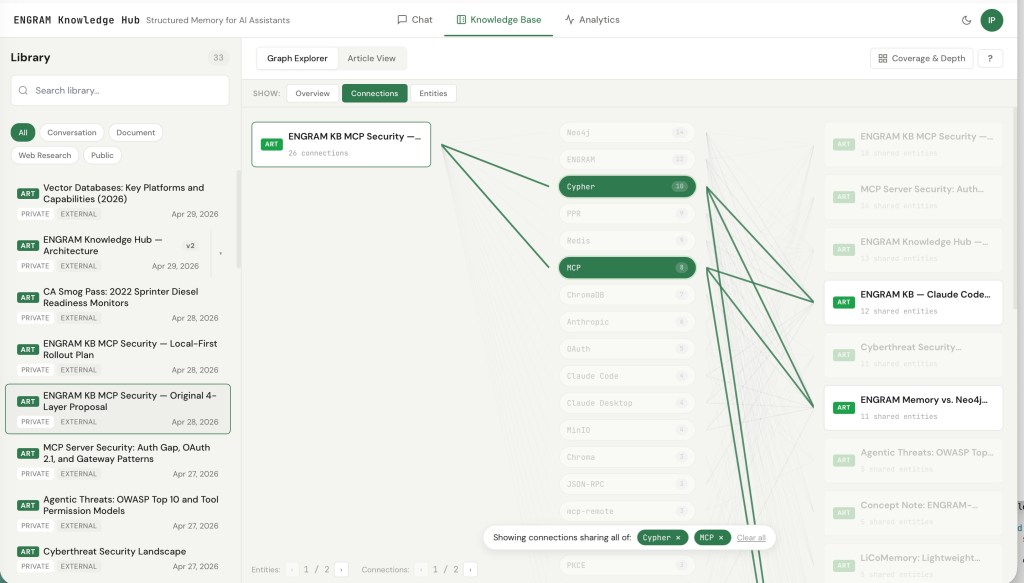
For research work, this view answers a question that’s surprisingly hard to answer otherwise: “what else have I written that connects to this through specifically these concepts?”
KB plays well with your existing tools: MCP
I didn’t want ENGRAM to be a closed system. If your daily LLM workflow lives in Claude Code, or Claude Desktop, or Cursor, or whatever MCP-compatible host comes next, the KB should be reachable from there.
The orchestrator hosts a Model Context Protocol server exposing six tools, authenticated via a Personal Access Token. Two write tools, four read tools:
| Tool | Purpose |
|---|---|
| sync_article | Write. Create-or-update keyed on (repository, file_path). Re-running on the same file produces a superseding version, not a duplicate. The right call for file-mirroring flows. |
| create_article | Write. Unconditional create. The right call for chat-originated content with no clear file identity. |
| search_articles | Read. Multi-token AND-ranked title search, with excerpts and version-chain metadata. Use when you know roughly what the article is called. |
find_related_articles | Read. PPR-based topic and concept discovery. Extracts entities from a free-text query, seeds Personalized PageRank against the user’s NounPhrase graph, and ranks articles by structural relevance — returning matched entities and excerpts alongside the score. Use when title search is too narrow: comparison-set queries, “what do I have on X,” or anything where the topic isn’t in the title verbatim. |
get_article | Read. Fetch full markdown by ID, plus version-chain metadata so an agent can walk to the latest version when needed. |
| list_articles | Read. Recent articles, latest-of-chain only. Filter by trigger type (e.g. external/MCP-created), date range, or tag. |
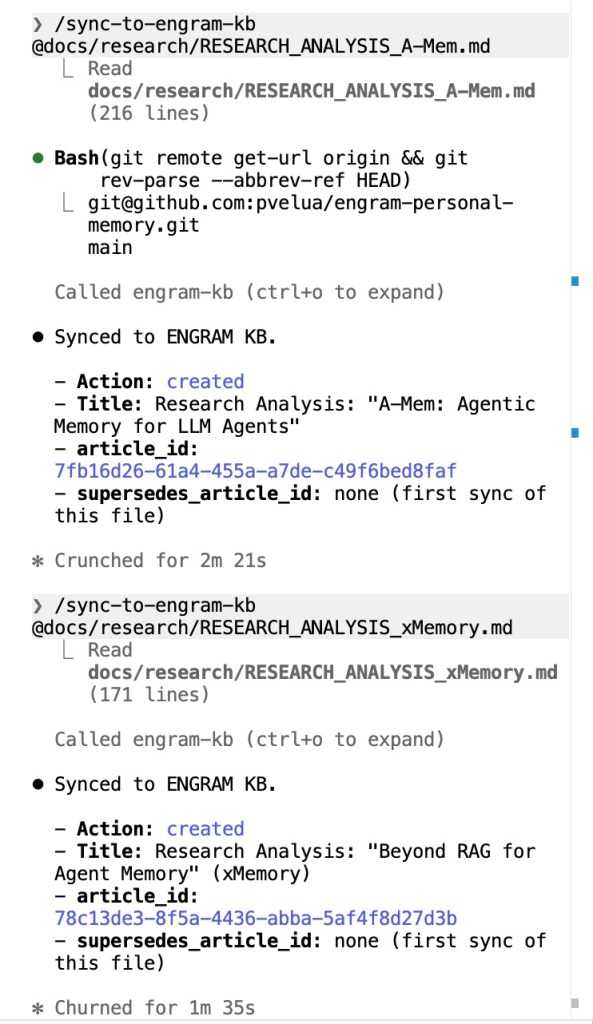
/sync-to-engram-kb on a project file.Claude Code running /sync-to-engram-kb on a project file. The first call creates a new article; running the same command on the same file later creates a new version with a SUPERSEDES edge — no duplicate, no manual ID lookup. Idempotency comes from the (repository, file_path) key.
In Claude Code, three project or global-scoped slash commands wrap the tools. Both /add-to-engram-kb and /sync-to-engram-kb auto-derive repository from git remote and branch from git rev-parse, so syncing a design doc into the KB is one argument: the file path. Coming back to that file a week later and re-running the same command updates the KB article in place (no duplicate created, no manual ID lookup). A third command, /find-in-engram-kb, takes a free-text topic and surfaces ranked articles with their PPR scores, matched entities, and excerpts which is the same kind of result you’d get if you asked the question in the ENGRAM chat itself.
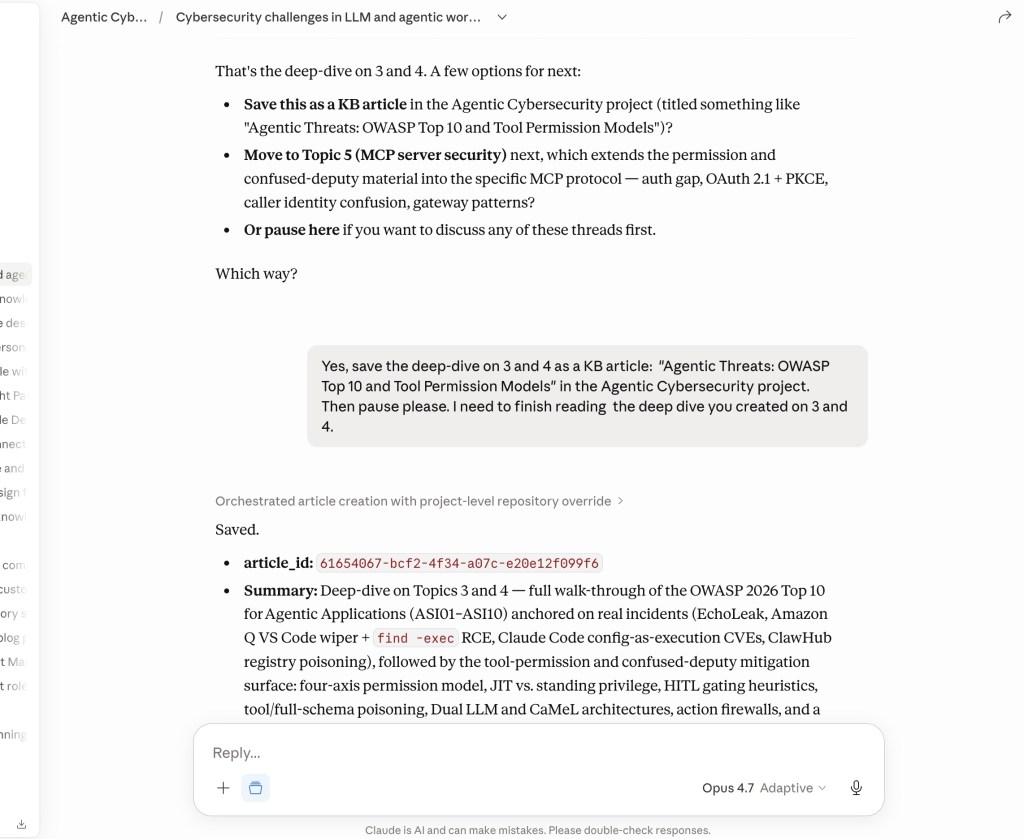
The same workflow from Claude Desktop. Project-level Custom instructions can layer default source_context metadata (like the repository name shown here) on top of the server-side tool-selection rule. Different host, identical write path on the orchestrator side.
The interesting thing about find_related_articles isn’t that it exists as many KB tools have search. It’s that it runs the same PPR + entity-graph retrieval stack the chat client uses. A topic query from Claude Code activates the same NounPhrase nodes, traverses the same graph, and ranks articles by the same structural-relevance criteria the chat applies when injecting context. There is no parallel search pipeline kept in sync with the chat retriever, and no capability gap between asking ENGRAM in the chat UI and asking ENGRAM from any other agent that speaks MCP.
The audit trail is the same regardless of which client wrote the article. Every MCP-driven create or update produces the same (:Action {action_type: 'article_created' | 'article_updated'}) provenance node and the same high-importance working memory entry that chat-driven actions produce. Which means:
- Memory Explorer surfaces MCP-driven activity the same as chat-driven activity.
- PPR retrieval treats MCP-created articles identically to conversation-created articles.
- Future queries in chat naturally pull in articles you wrote from Claude Code, with full attribution back to where they came from.
This is the architectural payoff of the MCP server living co-located with the orchestrator rather than as a separate ingestion service: there is exactly one write path, exactly one audit graph, and zero risk of the KB and the conversation graph diverging.
Use case: a hub for the KBs you already have
I spent a significant part of my career building enterprise content management and knowledge discovery systems, and the pattern I kept watching unfold is depressingly consistent. A company has Support docs in one tool, IT Help articles in another, a Dev Docs library in a third, and HR policies in a fourth. Each one might have an AI assistant bolted onto it now (vendors are racing to ship those) but the assistants are still per-silo. Ask “what do we know about [a thing] across the organization” and you get four separate answers from four separate UIs, each blind to the others.
Bolting AI onto silos doesn’t solve information partitioning. It just makes each silo individually better at answering questions about itself.
ENGRAM’s machinery happens to be well-suited to the cross-source case, almost as a side effect of how it’s already built. NounPhrase MERGE links entities across sources by default as an IT doc and a dev doc that both mention the same internal product end up sharing graph nodes whether they came from Confluence or ServiceNow, Zendesk, Box or a CMS repository. PPR retrieval traverses that unified graph without per-source routing logic. The visibility model already handles private + public scoping per article. There’s no enterprise-search-style federation layer needed; the consolidation happens in the graph.
There are two paths to get your content into the hub:
- The hard way. Export from the source system as PDF, markdown, or text; attach to a chat; ENGRAM ingests it through the same document pipeline you’d use for a research paper. Works for everything. Tedious at scale.
- The easy way. If the source system has an AI assistant of its own, point that assistant at ENGRAM as an MCP client. Use
sync_articlewith(repository, file_path)derived from the source system’s identifiers, subsequent re-syncs produce versioned updates rather than duplicates. The source system keeps owning its content; the hub just stays in sync with it.
The active/actionable distinction matters here. Enterprise search products stop at “find me the doc that mentions X.” ENGRAM’s contribution is that the unified content participates in generation: ask “compare what our IT docs say about authentication vs. what dev docs say,” and what comes back is a new article that’s itself a graph node which is retrievable by the next person who asks the same question and reusable as input to the next analysis. The hub doesn’t just aggregate; it produces new knowledge.
A few honest caveats, because the moment I mention “company KBs” anyone with operational experience starts asking the right hard questions:
- Freshness is not solved by
sync_articlealone. Idempotent re-sync handles de-duplication when a re-sync happens. It doesn’t decide when re-syncs should happen. Real deployments need either an event-driven trigger (e.g., a webhook from the source system on document change), or a scheduled poll, or better, an autonomous agent either collaborating with external KB assistant, or acting on knowledge gaps it discovered in ENGRAM KB. Neither of which is in the current implementation. - Personal Hub scale is personal. Even with per-user data filtering, a single-tenant Neo4j DB is fine for personal and small-team use. True multi-tenant deployment with thousands of users and hundreds of thousands of source documents is the territory of the Enterprise variant, which shares the patterns but has different operational concerns such as partitioning, isolation, indexing throughput.
- The “easy way” depends on the source system having an MCP-capable assistant. The MCP ecosystem is growing fast, but coverage across enterprise tools is uneven, and the integration effort still varies by vendor.
The pattern I watched failing in enterprise content systems for two decades was the same one each time: a project to “consolidate the KBs” that turned into a years-long ETL exercise, owned by a team that didn’t use the resulting system, producing a search experience nobody adopted because nobody trusted it. ENGRAM’s bet is different: content stays where it lives, the hub is a layer of structured connections on top, and the unit of consolidation is a user’s actual research questions rather than a centralized indexing project. Whether that bet holds at full enterprise scale is a question for the Enterprise variant.
Why this matters
I think that a few different audiences will care about different parts of this blog:
For individual researchers and engineers, the value proposition is simple: your AI conversations stop being a throwaway. Six months in, the system knows what you’ve worked on, surfaces the right prior context automatically, and gives you a traverse-able graph of your own thinking. The compounding effect is real as every conversation makes the next one slightly better-grounded.
For technical leaders and architects evaluating LLM memory, the design choices matter beyond the surface features:
- Graph-native, not vector-only. Most “memory for LLMs” products today are vector stores with some metadata. They retrieve by similarity. ENGRAM retrieves by structural relevance via PPR over a graph that captures relationships, not only embedding proximity. The difference shows up most on multi-hop queries such as “what did I conclude about X given the constraints I documented in Y”, where similarity-only retrieval typically misses.
- Inspect-able, not magical. The Memory Explorer, the audit trail, the version history, the topic map are concrete UI views over what the system is doing. For anyone who’s tried to debug a hallucinating RAG pipeline in production, the difference matters.
- Composable with what you already use. MCP integration means the Knowledge Hub isn’t a destination you have to switch to. It augments the tools your team is already using.
For executives, the question is usually some version of “is this real, or a demo?” The honest answer: this is a working personal system that I use on a daily basis, but not yet a productized multi-tenant offering. However, the architectural patterns it demonstrates (associative memory, graph-driven retrieval, MCP-native integration with existing tools) are the same patterns that will show up in ENGRAM Enterprise for team knowledge bases. The Knowledge Hub is the personal scale; the same machinery extends to teams and to specialized research domains.
Where to go next
If you want to dig deeper into specific components:
- GraphRAG with hippocampal-like associative retrieval (Part 1) – the foundational retrieval mechanics: PPR, entity resolution, graph projection.
- Unified retrieval from long documents and multi-agent synthesis (Part 2) – how documents and conversations end up in a unified retrieval surface; the multi-agent response generation.
- Hippocampal-inspired memory: working memory, long-term memory, and periodic consolidation (Part 3) – the memory pipeline, consolidation, importance scoring.
- When graphs remember better than summaries – why structural memory beats summarization-based memory on longitudinal benchmarks.
The Knowledge Hub layer adds the article model, the topic map, the inspector UI, and the MCP integration on top of all of that. If there’s a specific piece you want me to write up next such as the article triggers and immutable versioning, audit trail, the Leiden detection and stability matching, the MCP server design, let me know.


6 Comments