
Long-term memory across research, planning, and the iterative work of building
This is a follow-up to ENGRAM Knowledge Hub: A Personal Knowledge Graph That Grows With Your Research post which introduced the ENGRAM system: a personal GraphRAG-based assistant that distills my conversations and research into a knowledge graph and retrieves prior context by structural relevance, instead of recency. If you haven’t read it, the short version is that the Knowledge Hub turns my accumulated thinking into a queryable substrate. Conversations with AI assistants are consolidated into memory nodes, structured research becomes articles, and a Personalized PageRank traversal of the graph pulls the most relevant pieces back into future queries.
This post is about the next layer of knowledge consolidation. Ingestion of Claude Code sessions into the Knowledge Hub allowed me to close the gap between what I researched and planned and what I actually built, including the changes, feature design enhancements, and pivots that often happen during development.
The gap: write-only memory at the keyboard
When you finish a long Claude Code session (the one where you finally untangled and fixed a stubborn bug, refactored a few services, and quietly decided to defer some half-formed idea for later) what happens to all that knowledge?
In my setup until recently: nothing useful — unless you count manually copying excerpts from a Claude Code session into a markdown file, which I sometimes did out of frustration. I knew the session transcript got written to ~/.claude/projects/ and stayed there, opaque to everything except claude --resume. I also noticed Claude Code recently starting to generate a single-paragraph recap mid-session, summarizing file edits and decisions made so far. But until I had built ENGRAM Knowledge Hub, it didn’t occur to me to harvest any of it – not as knowledge that I can query, not as long-term memory I could share back with Claude in future sessions, not even as an audit trail of what changed and why, via the Action entities the session ingestion captures.
That last bit (the audit trail) is what finally made the asymmetry hard not to see. The Hub was already indexing every other substantial source of knowledge I produced such as KB articles, attached documents, chat conversations. It just had a hole in the shape of “everything I actually did at the keyboard”.
Parallel memory architectures
Before getting into how the integration works, it’s worth noticing that Claude Code and ENGRAM had already developed strikingly parallel memory architectures. They just hadn’t been talking to each other.
Both systems handle the same set of memory problems: keeping live context available, compressing it when space runs out, persisting durable knowledge across sessions, recording the canonical history for replay, and reviving prior state into a fresh session. They use different machinery for each, but the conceptual layers map onto each other almost exactly.
Live context. Code’s in-flight conversation buffer is what fits in the current session’s window. ENGRAM’s working memory is a Redis cache keyed per-conversation, populated as messages stream in. Both are “what’s hot right now,” scoped to the current session.
Compression. When Code’s context fills up, the harness produces a compact summary that replaces older turns. Mechanism is lossy, but compact. By default ENGRAM consolidates working memory every five minutes by clustering candidate memories on shared entities and compressing each cluster into a single long-term memory node which is also lossy, also compact. Different mechanism, same purpose.
Durable knowledge. Code reaches for CLAUDE.md, AGENTS.md, and other auto-loaded markdown files that live in the project repository and persist across every session that opens it. ENGRAM stores long-term memory as Neo4j nodes that persist across every conversation a user starts, scoped to that user. Both are durable, both are the “what I’ve learned that should outlive this session.”
Canonical record. Code’s session JSONL is the append-only ground truth that has every turn, every tool call, every artifact on disk. ENGRAM’s conversation persistence does the same job in Neo4j, with an additional Action node audit trail recording what happened during each conversation. Both serve the same function: a replayable, debuggable history of what occurred.
Reviving prior state. Code’s CLI claude --resume replays a prior session’s full JSONL into a new context, reanimating the prior state. ENGRAM merges retrieved long-term memories with the current conversation’s working memory at query time which is a much lighter mechanism, but with the same goal of bringing prior context to bear on the present.
That is five layers where Code and ENGRAM solve the same memory problem with different primitives. The asymmetry and what ENGRAM adds that Code doesn’t have is the retrieval layer. Claude Code’s mechanism for using its long-term knowledge is essentially “load every relevant .md file on session start”: the harness opens whatever matches a path pattern and the user has to have organized things well enough that the right files load. ENGRAM, instead, runs Personalized PageRank over an entity graph: the system selects what’s relevant by structural connection to the query, ranks it, and surfaces the top results. All-or-nothing loading versus rank-and-select retrieval. That difference is what makes integrating Code’s session content into ENGRAM useful: Code’s primitives produce rich, structured per-session memory; ENGRAM gives that memory a retrieval layer it didn’t have on its own.
Two kinds of memory, complementary by design
Mechanism-level kinship sets up the integration. The reason it actually pays off is that the content on each side answers a different question.
Articles answer what have I researched? such as comparative analyses, architecture write-ups, design docs, literature reviews. They’re the result of thinking about something. They tend to be structured, prose-heavy, and intentionally cleaned up for re-reading.
Coding sessions answer what did I do? meaning the diagnoses, the file edits, the bash commands, the decisions made under fire. They’re the result of working on something. They’re transactional, action-heavy, and usually messy because they’re a record of figuring things out.
Both are valuable. Both are full of overlapping entities e.g., a Docker Compose migration article and the coding session that implemented it share the same project name, the same database, the same framework. But they answer different questions, so it’s worth keeping them as distinct node types in the graph while letting them live in the same shared web of named entities underneath.
That is the key design choice: different content, same connective tissue.
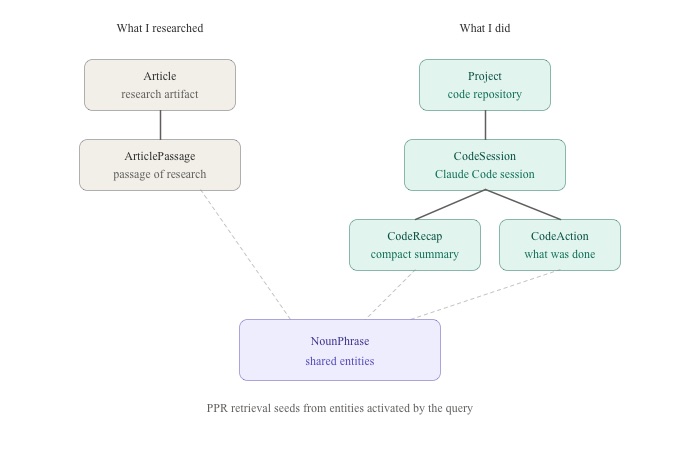
Existing nodes (gray on the diagram) and the new additions (teal) live as parallel hierarchies that share the same NounPhrase web (purple). Solid arrows are parent-child structure; dashed lines are MENTIONED_IN edges into the shared entity layer. PPR retrieval seeds from entities activated by the user query and traverses both sides on a single pass; there’s no separate “search the code sessions” path.
The interconnection goes deeper than just “two node types in one graph.” Articles capture the thinking before and around implementation. Sessions capture the implementation itself, including the parts where the implementation surprised the thinking, where pivots happened, where the half-formed idea got deferred. When the same project appears in both (as it does for almost any non-trivial piece of work) those two records are about each other. The article informed the sessions; the sessions revealed gaps the next article needed to fill. Linking them through shared entities turns that mutual reference from implicit (in your head, if you can remember) to explicit (in the graph, retrievable).
The mechanism-level parallels make the integration clean. The content-level complementarity makes it useful.
What it lets you do
Once a Claude Code session ends, ENGRAM ingests it: parses the JSONL, redacts secrets, generates a session-level summary, extracts entities from each compact recap and from the file edits, git operations, and bash commands, then writes the result into the same graph that holds my articles. The session becomes a first-class graph citizen with its summary, compact recaps, and actions all entering the same NounPhrase web that already connects articles, conversations, and document passages.
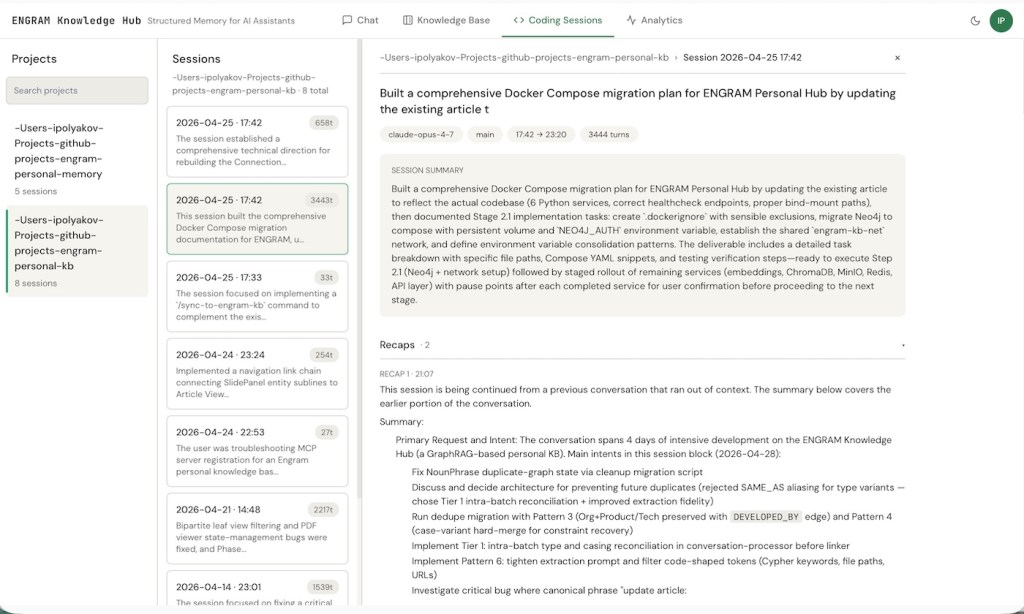
Three concrete things this view unlocks.
Cross-source recall in chat
A few weeks ago I worked through whether subagent JSONLs from Claude Code’s harness should get their own attribution path in the graph. The thinking lived in a design doc article. The implementation decision to deliberately skip subagent transcripts in this iteration lived in a coding session. When I came back to that question last week and asked the chat “how did we decide on subagent attribution?”, retrieval pulled both: the article surfaced the rationale (with the schema additions I had considered and rejected for now), and the session surfaced what we actually shipped (the filter rule and the deferred follow-up). The same Personalized PageRank ranks them uniformly – the most relevant context wins regardless of which surface produced it.
This is the small but constant win. Most non-trivial questions about past work touch both research-shaped and execution-shaped memory. Having them in one graph means the chat answers them as one question, not two.
A new lens on your work
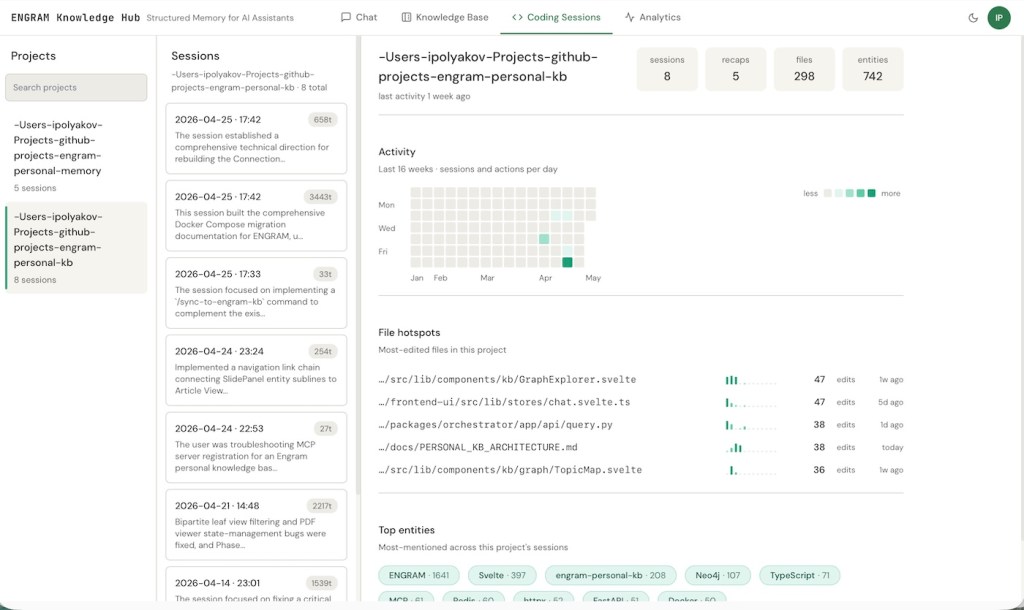
A “Coding Sessions” tab joins the existing Chat, Knowledge Base, and Analytics tabs. Pick a project, and a dashboard appears: at the top, headline counts for that project (sessions, recaps, files touched, entities mentioned); below, a 16-week heatmap of session activity day-by-day; below that, the most-edited files in the repository with their weekly cadence and edit counts; at the bottom, the top entities mentioned across the project’s sessions.
For my engram-personal-kb repo, the file hotspots tell a story I’d half-noticed but never quantified. The GraphExplorer component leads with 47 edits, the chat store has another 47, the query handler has 38, and PERSONAL_KB_ARCHITECTURE.md itself has 38 (which makes sense as that doc has been getting updated almost as often as the code it documents). The entity cloud at the bottom shows ENGRAM dominating with 1,641 mentions, then Svelte at 397, the repository name at 208, and a long tail of frameworks and technologies (Neo4j, TypeScript, MCP, Redis, httpx, FastAPI, Docker) each in the 50–110 range.
It’s the first time my own coding history has felt interactive to me rather than archaeological.
Sessions and articles, finally aware of each other
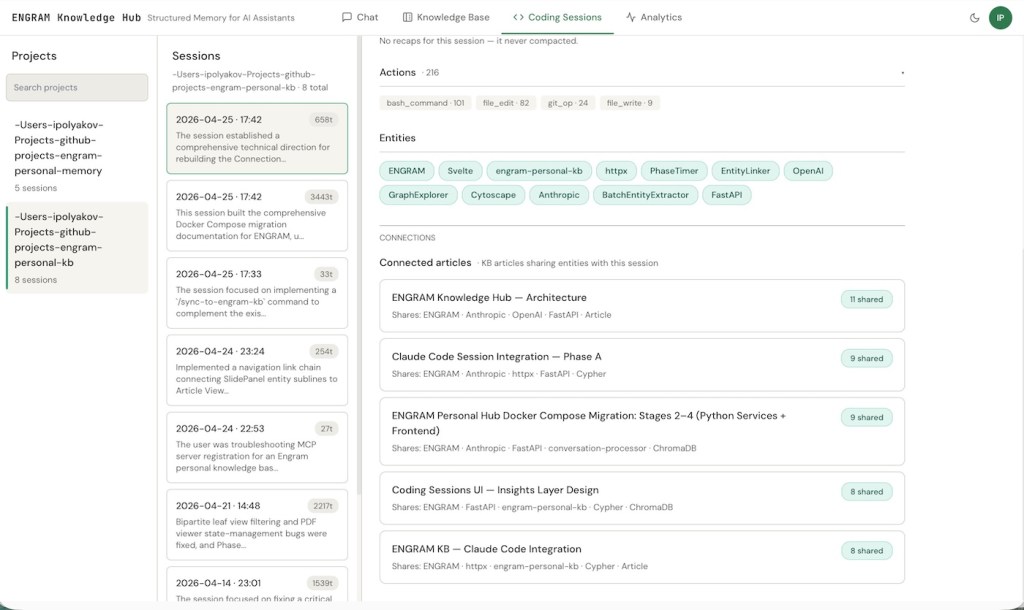
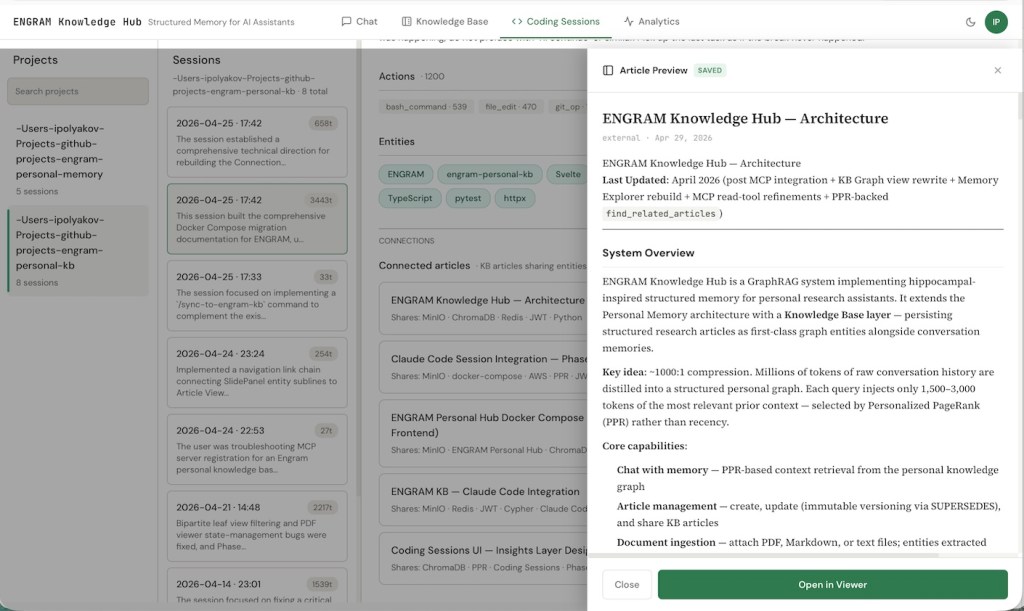
Click into any session and at the bottom you’ll see the KB articles that share entities with it, ranked by overlap count. The reverse works on the Article side. So a session is one click from the research note that informed it, and an article one click from the sessions that implemented it.
The April 25th session (six hours of work on rebuilding the Connections and Entities graph views) shows 11 shared entities with the architecture doc, 9 with the Claude Code Session Integration design, 9 with the Docker Compose migration article, 8 with the Coding Sessions UI Insights design, and 8 with the KB Claude Code Integration article. None of those connections were curated. They’re the natural overlap between writing about something and then working on it.
After several weeks of daily use, this is the connection I didn’t realize I was missing. Research and execution are living next to each other in the same graph, finally legible as a single body of work.
There’s also an agentic angle worth a brief mention. Claude Code itself, via two new MCP tools (ingest_code_session and find_related_code_sessions) can register sessions and recall prior ones on its own. The longer-term play is to have Claude Code look up what it did last time before starting non-trivial work in a repository, so that cross-session context informs the current task without --resume discipline. That’s the next step; what’s shipped today just makes the data available.
A note on opt-in
Every ENGRAM Knowledge Hub user does research and creates KB articles. Not every user builds software with Claude Code. Even those who do don’t necessarily want every coding session swept into their personal knowledge graph. So the integration is off by default.
The bigger reason for defaulting Code session ingestion to off is relevance. A user whose work is primarily research, writing, or analysis would see no value from this feature, and forcing it on for them would clutter the graph and dilute the retrieval surface. Mixing in coding sessions content is something you opt into when it matches the work you do, not something the system does for you.
Privacy is the other half of the reasoning. Coding sessions can contain real secrets pasted mid-conversation, internal file paths, decisions about half-baked ideas, frustrated asides about architecture choices. Three layered toggles gate the feature: a global ingest toggle (does the session-watcher run at all?), a global retrieval toggle (does Chat see sessions content?), and a per-request override (which can narrow retrieval scope for a single query but can never force it on globally which is a deliberate guardrail against accidental leaks in any future shared setup). A pre data commit secret-redaction filter scrubs personal access tokens, API keys, JWT-shaped strings, cloud credentials, and bearer tokens before any text reaches the graph. Anyone who never flips the toggles sees exactly zero behavior change.
Why this matters
A few different audiences will care about different parts of this work:
For individual researchers and engineers, the value proposition is simple: your AI conversations stop being throwaway. Six months in, the system knows what you’ve worked on, surfaces the right prior context automatically, and gives you a traversable graph of your own thinking. The compounding effect is real: every conversation makes the next one slightly better-grounded.
For technical leaders and architects evaluating this category, the design choices matter beyond the surface features:
- Graph-native, not vector-only. Most “memory for LLMs” products today are vector stores with some metadata. They retrieve by similarity. ENGRAM retrieves by structural relevance via PPR over a graph that captures relationships, not just embedding proximity. The difference shows up most on multi-hop queries such as “what did I conclude about X given the constraints I documented in Y”, where similarity-only retrieval typically misses.
- Inspectable, not magical. The Memory Explorer, the audit trail, the version history, the topic map, etc. all of these are concrete UI surfaces over what the system is doing. For anyone who’s tried to debug a hallucinating RAG pipeline in production, the difference matters.
- Composable with what you already use. MCP integration means the KB isn’t a destination you have to switch to. It augments the tools your team already uses.
Where to go next
The Claude Code session integration described in the post created a data-availability layer: coding sessions become first-class graph entities, retrievable alongside articles and uploaded documents in the KB. The next step on the Code side is the runtime-read directive: a CLAUDE.md instruction that has Claude Code call find_related_code_sessions proactively before starting non-trivial work, so that cross-session context informs the current task automatically. Then there are a handful of natural follow-ups: allow subagent transcript attribution, Claude Desktop session ingestion as a parallel node label, and a multi-machine session-watcher tool deployment that lets a remote Mac’s watcher post into a central Knowledge Hub. I’ll write each up as it lands.
For the broader background on the system this builds on:
- ENGRAM Knowledge Hub: A Personal Knowledge Graph That Grows With Your Research – the system tour: articles, the three graph views, MCP integration, audit trail.
- ENGRAM Part 1: GraphRAG with Hippocampal-Like Associative Retrieval – the foundational PPR and entity resolution mechanics.
- ENGRAM Part 3: Hippocampal-Inspired Memory – the consolidation pipeline that makes long-term memory possible.
- When Graphs Remember Better Than Summaries – why structural memory beats summarization-based memory on longitudinal benchmarks.
If a specific piece of the code-session integration interests you (e.g., the JSONL parser and noise filter, the secret-redaction set, the three-toggle precedence model, the file-watcher tool, or the MCP tool design) let me know and I’ll write it up.
 Igor's Musings About Technology
6 Comments